

A seller has a design file that looks clean on screen, a sheet of birch ply on the bed, and a listing draft that promises a premium finish. The first order arrives before the test coupon has been measured, the edges come off scorched, and the buyer asks why the finished piece does not match the photograph. That sequence is common with laser cut products, and it's preventable. Every line on the product page is a production promise. Material grade, thickness, edge finish and return terms only hold up when they're tied to a test cut, a batch record and a realistic lead time.
Table of Contents
- The Full Workflow From Design to Dispatch
- Choosing Materials for Each Product Type
- Safety Checks Before Production Starts
- How to Prepare Files and Run Test Cuts
- Finishing Sanding Colour and Protective Film
- Pricing, Lead Times and Order Types
- Writing an OfferLink Listing Buyers Can Trust
- Confirm Delivery, Returns and Compliance Before You Publish
The Full Workflow From Design to Dispatch
Say a batch of birch ply ornaments leaves the machine with dark, scorched edges. The buyer requests a refund because the listing said premium finish, and the seller can't show which sheet, settings or finishing method produced the batch. The failure didn't start at dispatch. It started at a stage nobody checked.
Most rework follows that pattern. A file opens at the wrong scale, a material arrives without documentation, or finishing gets improvised after cutting. Each unchecked stage pushes the problem forward until the buyer finds it.
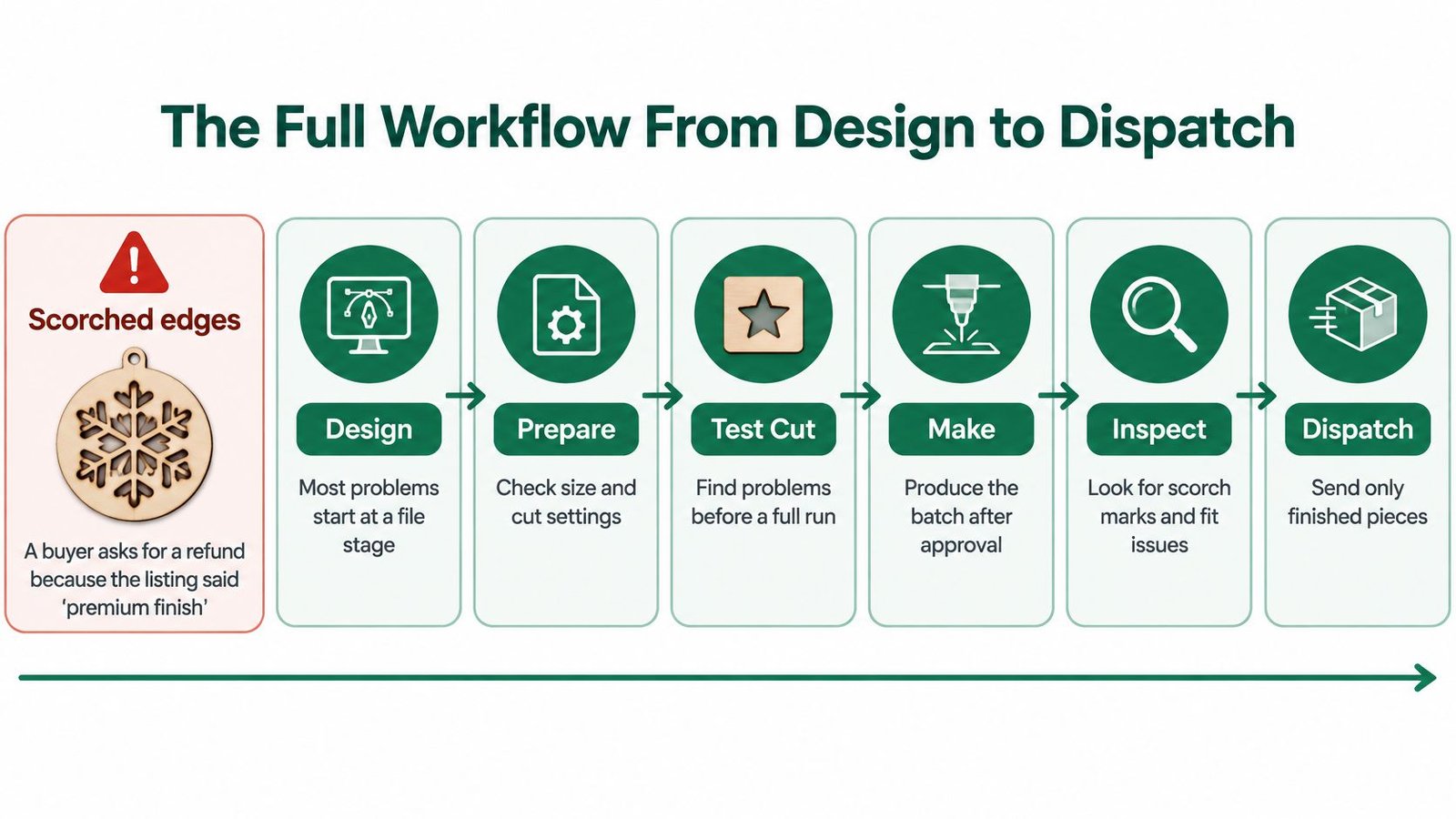
Seven stages with a checkpoint at each gate
| Stage | What you decide | Checkpoint before moving on |
|---|---|---|
| Design | Product use, file format and true size | Files open at 1:1 scale in your cutting software |
| Material | Substrate, grade and thickness | Supplier safety data sheet on file and material confirmed |
| Test | Power, speed, focus and assist gas | Edge quality and fit measured against your tolerance |
| Production | Batch size, nesting and extraction | Pre-use checks and batch record completed |
| Finishing | Sanding, colour and protective film | Finish sample approved against the listing |
| Listing | Specification, inclusions and lead time | Buyer sees exact scope and terms before payment |
| Dispatch | Packaging, delivery method and returns terms | Delivery and returns wording matches the listing |
The checkpoint matters more than the stage name. A design isn't ready because it looks right in Illustrator or Inkscape. It's ready when it opens at true size in the cutting software. A material isn't ready because a supplier labelled it laser ply. It's ready when the safety data sheet is on file and a coupon from that sheet has passed.
Practical rule: Don't let a later stage compensate for an earlier guess. Sanding won't fix a wrong tolerance, and careful packing won't fix an edge the listing misdescribed.
The workflow also runs backwards. A listing that's hard to write usually exposes a missing decision, such as an unstated tolerance or an untested finish. Sellers should draft the listing last, then revisit earlier stages wherever the wording turns vague. Keeping those stages connected is easier with a structured order management workflow that ties production notes to the order record rather than scattered messages.
Choosing Materials for Each Product Type
A material choice becomes a production promise as soon as it appears on a product page. A decorative acrylic sign, plywood toy, lampshade and kitchen item face different risks from heat, children, food contact and outdoor exposure. Choose for the product's expected use, including reasonably foreseeable misuse. Where a product category carries specific rules, get professional advice before listing it.
A documented acceptance gate
The Association of Industrial Laser Users laser FAQ lists mild and stainless steel, titanium, aluminium, thin copper and brass as generally suitable metals. It notes that highly reflective materials such as copper are more challenging, and advises against cutting PVC, which produces highly dangerous fumes. Use a consistent acceptance gate: identify the substrate, obtain its safety data sheet, check machine compatibility, then run a test coupon. Inspect the edge and dimensional fit, and record power, speed, focus, assist gas and pass count before releasing a batch.
| Material | Suitability | Check before cutting |
|---|---|---|
| Mild steel | Generally suitable | Confirm grade and coating with the supplier |
| Stainless steel | Generally suitable | Expect edge colour change; confirm grade |
| Aluminium | Generally suitable | Reflective; test settings and assist gas first |
| Brass (thin) | Generally suitable | Reflective; test coupon before any batch |
| Thin copper | Generally suitable, but highly reflective and challenging | Use proven settings and test coupons |
| Titanium | Generally suitable | Confirm alloy and finish with the supplier |
| Cast acrylic | Commonly used | Verify polymer identity and grade; check edge finish |
| Birch plywood | Commonly used | Check adhesive layers; expect smoke marks |
| MDF | Use with caution | Check binder and dust; extraction is essential |
| Leather | Commonly used | Confirm tanning method; check odour and extraction |
| PVC | Do not cut | Produces highly dangerous fumes |
| Polyurethane | Do not cut | Avoid cutting; decomposition fumes are hazardous |
| Unidentified stock | Do not cut | No safety data sheet and no identified composition |
Outdoor use changes the material decision. Weather exposure can affect both the substrate and the finish, while mounting and legibility shape what the buyer expects from a sign. Compare address plaque designs from Evright Industrial when deciding how those details should suit an exterior product rather than indoor display.
Common failures start with incorrect polymer identification, then show up as melt-back, charring or inadequate support and masking. An engraving test does not establish that through-cutting is safe: a deeper cut exposes more material to heat for longer. Record the qualified grade, thickness, finish and acceptable edge variation, then carry those exact specifications onto the listing. If the batch varies from the tested material, pause and qualify it again before promising it to a buyer.
Safety Checks Before Production Starts
Extraction and fire control aren't finishing touches. They're prerequisites, and a batch that can't run safely shouldn't run at all. The Health and Safety Executive guidance on fumes similar to welding fume states that laser cutting generates fumes subject to COSHH and that exposure must be controlled to a standard comparable with welding fume controls when operators may be exposed, with suitable fume extraction or respiratory protection where required.
That's the point sellers miss when they optimise for speed or edge appearance first. A fast cut with incomplete extraction isn't an efficient cut. It's an uncontrolled one.
The sequence before the first cut
- Risk assessment and approval: Complete both before production, not after the first order lands.
- Local exhaust ventilation: Commission the LEV system before cutting, and run extraction during cutting plus an overrun period afterwards.
- Standard operating procedure: Name acceptable materials in writing, so nobody improvises with unknown stock under time pressure.
- Pre-use checks: Carry them out each session, covering extraction, machine condition and material identity.
- Servicing and training records: Keep them documented and current, not reconstructed from memory.
Sellers structuring these controls can use general guidance on applying the hierarchy of controls to think through eliminating a hazardous material before relying on extraction or personal protective equipment alone.
The process should stop automatically when extraction is unavailable, because fumes and particles can be flammable and LEV also reduces fire risk. Visual appearance doesn't reveal toxic decomposition, so PVC, polyurethane and unidentified stock stay refused even when a trial edge looks acceptable.
A test coupon can look perfect and still be the wrong evidence. Edge appearance says nothing about what went into the air.
The batch record
Retain one record per batch covering material identity, machine settings, operator, inspection result and rejected pieces. That record does commercial work too. It lets the seller state whether smoke marks, odour, edge colour change or dimensional variation are normal for that product. Keep the one-page procedure beside the machine, where the operator stands, rather than filed where nobody reads it during a busy run.
How to Prepare Files and Run Test Cuts
Most fit problems are file problems that the machine faithfully reproduces. The test cut is the cheapest place to find them, because scrap and five minutes of measuring cost far less than a remade batch and a refund.

File preparation and test procedure
- Export at true size. Export a vector file, commonly SVG or DXF, and confirm it opens at 1:1 scale in the cutting software. Sellers used to print workflows will recognise the discipline from a beginner's guide to supplying print artwork, where checking size and format before submission prevents avoidable reprints.
- Separate operations clearly. Put cut and engrave instructions on distinct line colours or layers, then delete duplicate and hidden lines that cause double cuts.
- Check minimum features. Test narrow bridges, small internal holes and sharp corners against the actual material and thickness, since thin features break or char first.
- Allow for kerf. Parts that must slot together need a kerf offset, and that offset gets proven on scrap before it enters the production file.
- Nest with spacing. Leave enough room between parts to limit heat distortion and keep offcuts usable for coupons and small pieces.
- Cut the coupon from batch stock. Use the same sheet as the batch, not a leftover sample from a different delivery.
- Measure against tolerance. Check fit, edge quality and dimensions against the tolerance that will appear on the listing.
- Record the settings. Log power, speed, focus, assist gas and pass count alongside the material batch.
- Approve or stop. Release the batch only when every measured value sits within tolerance. A near miss on the coupon becomes a failure at quantity.
Two edge cases worth planning for
Fine text that survives on thick acrylic can fail on thin acrylic, where narrow strokes soften, melt back or snap during cleaning. The fix is a bolder typeface, larger text or engraving instead of cutting, decided at file stage rather than after a ruined sheet.
Sheet thickness variation causes the second trap. A tab and slot joint can fit perfectly on one plywood sheet and jam or rattle on the next, because nominal thickness and actual thickness differ. Measuring each new sheet with callipers and adjusting the slot width before nesting prevents a whole batch of joints that need forcing or gluing to behave.
Finishing Sanding Colour and Protective Film
Finishing is where a good cut still fails the buyer. Decide every finish before the batch starts, list it on the batch record with its method and consumable, and don't invent steps at the packing bench.
- Sand or clean edges to a defined method. Test the grit or cleaning method on an offcut first, because heavy sanding rounds the crisp edge the listing describes and can widen slots that were cut to tolerance.
- Remove smoke marks with a tested method. If marks won't shift on the test coupon, the listing should say light smoke staining is possible instead of promising a clean edge.
- Approve colour on batch stock. Apply stain or paint to a sample cut from the same sheet, compare it with the listing photograph in daylight, and note colour variation between sheets.
- Apply film or lacquer last. Wait until the piece is cool and dry, then check the coating doesn't lift at cut edges or pool in fine detail.
- Store flat and compare. Keep finished pieces flat and clean, and check a sample from each batch against the approved sample before packing.
Finishing choices feed straight into the product page. An optional, variable or hand-applied finish needs stating plainly, including what variation the buyer should expect. Any finish on an item used with food, children or heat needs checking against material suitability for that use, not assumed safe because it looks cured.
Pricing, Lead Times and Order Types
Pricing every piece as if it were a repeat run is the most expensive habit in small batch laser work. Setup, design proofing, and test cuts are fixed costs. They land very differently on a single custom piece than on fifty identical ones, and a price that ignores that difference turns one-off orders into subsidised work.
| Order type | Setup and proofing | Lead time pattern | Waste and consistency | Pricing effect |
|---|---|---|---|---|
| One-off custom piece | Full design proof for each order | Queue time dominates; proof rounds add time | Higher waste per piece | Setup cost spread over one item |
| Small identical batch | One proof and one test cut, then repeat | Setup paid once per batch | Waste falls as nesting improves | Unit price drops with quantity |
| Repeat production | Stored settings and approved file | Mostly production and finishing time | Most consistent when settings are logged | Lower unit cost; check reorder terms |
What belongs in the listing
Buyers compare headline prices, but sellers should cost the whole job. Total cost, lead time, waste and consistency give a truer picture than unit price alone. A cheap one-off quote that excludes proofing usually reappears as delays, extra charges or a rushed finish.
- Order type offered: State whether the price covers a one-off, a batch or a repeat of an approved file.
- Proof rounds included: Name how many revisions are included and what counts as an extra, such as new artwork or a size change after approval.
- Lead time basis: Separate proofing time from production time, since the clock can't start until the buyer approves the design.
- Reorder terms: Confirm the file, settings and material remain available, and say whether the original price still applies.
Sellers should build costings from measured setup times in the workshop rather than borrowed figures from other businesses. Machine, material and finishing choices differ too much for copied numbers to survive contact with real orders. Checking current selling costs against a transparent fees page before setting prices keeps the margin calculation honest, since platform costs belong in the same costing sheet as material and machine time.
Costing habit: Time the next three setups with a stopwatch. Most underpriced one-off work traces back to setup minutes that were never counted.
Writing an OfferLink Listing Buyers Can Trust
Premium finish is the kind of listing line that causes refunds. It sounds reassuring and commits to nothing, so the buyer fills the gap with expectations the workshop never agreed to meet. A stronger line names the facts. Birch plywood at a stated thickness, edges sanded with light smoke staining possible, tells the buyer exactly what's arriving.
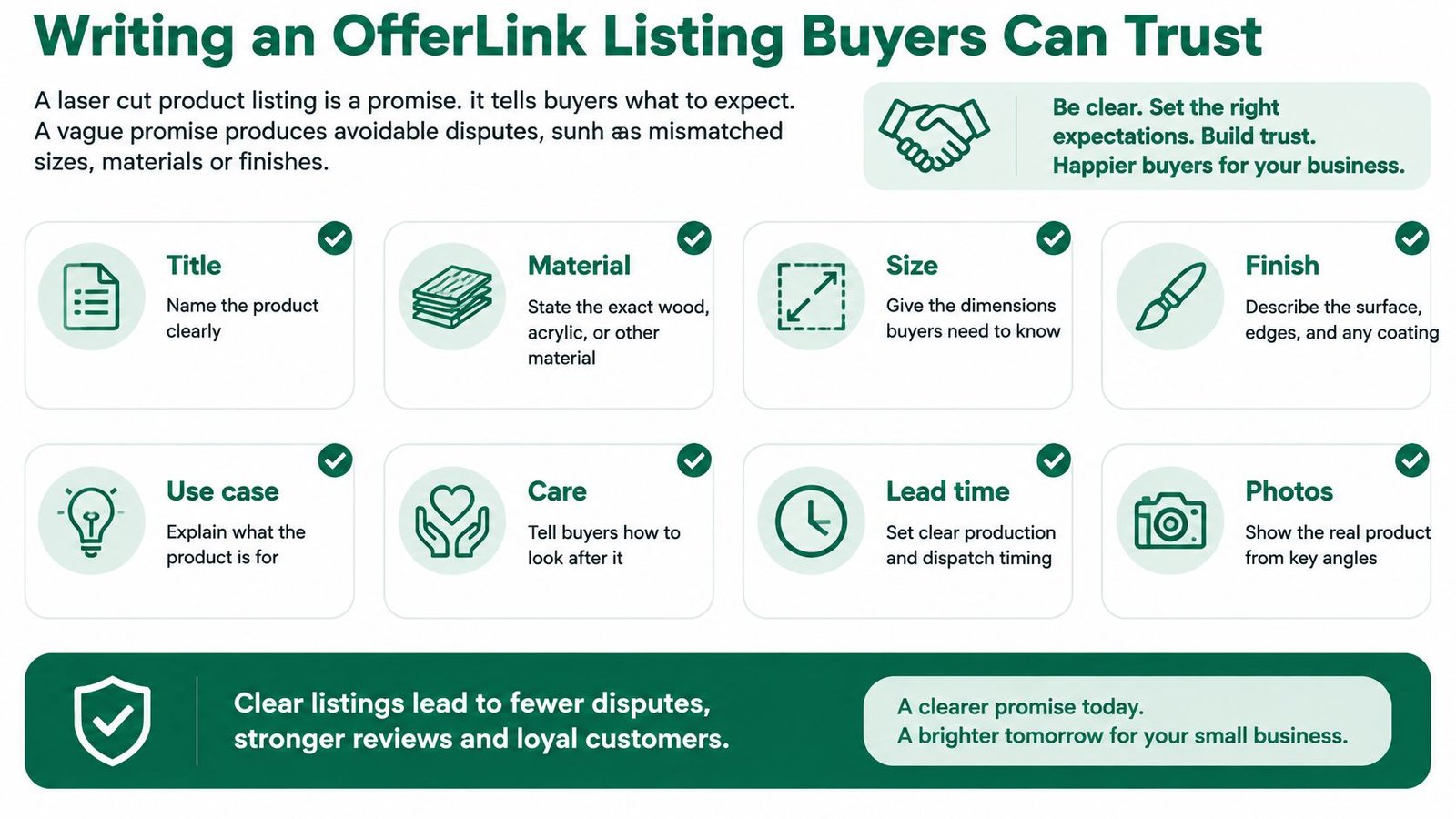
Fields that carry the promise
An effective product page for laser cut products names the product type and material in the title, then covers intended use and limitations in the description. Material grade, thickness, finish, tolerances and acceptable colour or edge variation follow from production decisions already made. Inclusions state what's in the box and what isn't, such as fixings, stands or hanging hardware. Care instructions, relevant warnings and the delivery condition complete the picture before payment, not after a disappointed message arrives.
Structured OfferLink product pages can carry these details alongside price and fulfilment information, keeping scope in one place the buyer reads before paying. That structure only helps when the seller fills it with tested facts rather than adjectives.
Pre-publish checklist
- Material and thickness: Stated exactly as qualified during testing.
- Intended use and exclusions: Written plainly, including uses the product isn't made for.
- Tolerance and edge variation: Described in terms a buyer can judge from photographs.
- Test cut evidence: Referenced where fit or finish matters, such as slot together kits.
- Inclusions and extras: Listed separately so optional finishes aren't mistaken for standard ones.
- Production and dispatch timing: Split clearly, with proof approval placed before the production clock.
- Returns and personalisation terms: Linked from the listing, not buried after checkout.
Compare two descriptions of the same ornament. The weak version promises a premium handmade finish. The stronger version states the plywood type and thickness, notes that edges are lightly sanded and may show faint smoke shading, and gives the hanging cord as included. The second version sells slightly less romance and far fewer disputes, because the buyer and the batch record are finally describing the same object.
Confirm Delivery, Returns and Compliance Before You Publish
A product page makes a production promise. Its delivery estimate, return terms and compliance details should match what the workshop can fulfil and what the buyer sees before checkout. Set these terms before publishing; changing them after an order arrives can turn a clear transaction into a negotiation. This is general information for UK sellers, not legal advice for a specific business. Check current official guidance and seek professional advice if your circumstances are unclear.
Physical products and the cancellation window
UK consumers usually have a statutory right to cancel online purchases within a set period after delivery. Exceptions can apply, including to goods made to a customer's specifications or clearly personalised. Because laser cut products may fall into this category, check the current consumer-rights guidance for the specific product rather than assuming an exception applies.
State delivery, cancellation and return instructions before payment, and handle each order consistently with the published seller protection policy resource and the terms shown to the buyer. A vague promise such as “returns accepted” leaves questions about who pays return postage, what condition an item must be in and how a personalised order is handled. Make the buyer's expectations specific, and ensure they match the listing and the batch record.
Digital files, packaging and marketing
Downloadable cut files need separate terms. If access is supplied immediately, obtain and record the customer's express agreement to immediate supply and confirmation that the cancellation right will be lost once supply starts, before providing access. State the file format, contents, licence restrictions and technical requirements on the page. Instant delivery does not answer those questions.
Packaging also needs a check. Assess the packaging supplied with orders, not just the product's weight, and review whether packaging producer responsibility thresholds apply for the relevant reporting year. Marketing consent is separate from checkout: a purchase does not by itself grant unrestricted permission to send promotional messages. Handle consent, or any applicable existing customer basis, deliberately and provide a clear opt-out.
Publish only when the listing, terms, batch record and packaging describe what the workshop can deliver. If a material grade, finish, delivery promise or return condition is still a guess, resolve it before taking payment. That keeps the product page aligned with the test cut, the production batch and the buyer's expectations, reducing avoidable rework and disputes.