
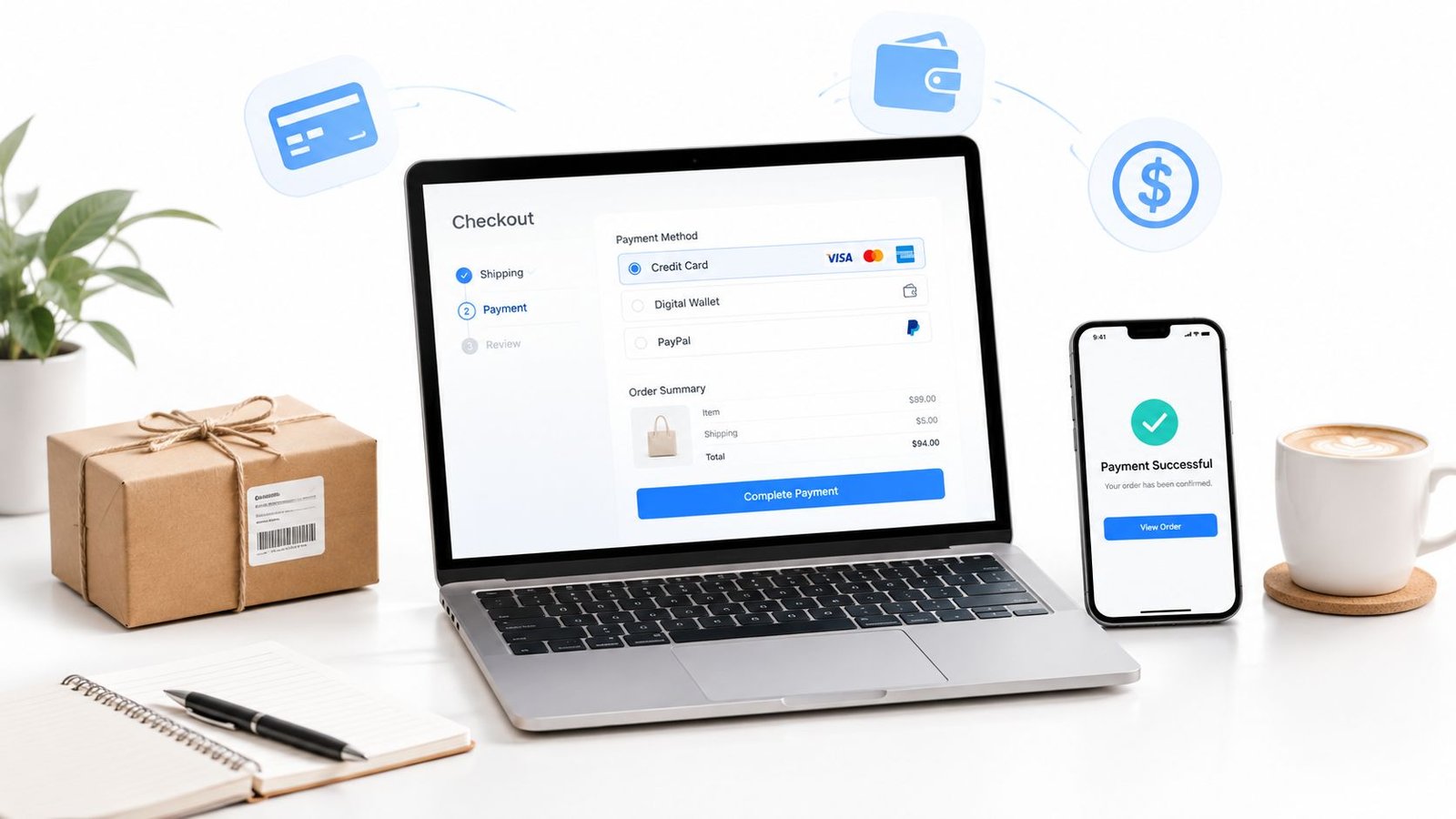
The first sale changes the conversation. A buyer has clicked, checked out and paid, but the real job starts after that, because getting paid online is never just about a button on a page. It's about choosing a payment route that fits the offer, giving the buyer enough clarity to trust the order, and keeping a clean record when payment, delivery or access needs to be proven later.
For a seller shipping mugs, delivering a download, booking a consultation or running a live workshop, how to accept payments online means different things in practice. Cards may still be the safest default for many buyers, while wallets and bank methods can make sense for faster checkout or recurring relationships, depending on the offer and audience, and the right setup should make that choice feel obvious rather than crowded.
Table of Contents
- What Accepting Payments Online Really Means for Sellers
- Choosing the Right Way to Get Paid for Your Offer Type
- Setting Up Checkout Without a Website Build
- What Buyers Should See Before They Pay
- Fees Currencies Payouts and Staying Secure
- Launch Checklist and Next Steps for Steady Sales
What Accepting Payments Online Really Means for Sellers
The first online sale usually feels simple. A customer taps a Pay button, money moves, and the job seems done. In reality, accepting payment online means managing a chain of decisions that starts before checkout and continues after the order is confirmed.
For a physical product, that chain includes stock, shipping, delivery proof and refund handling. For a digital product, it includes access timing, download delivery and what happens if the buyer claims they never received it. Services and live sessions add another layer, because the seller has to make the scope, timing and cancellation boundary clear before money changes hands.
A payment provider sits in the middle, but it isn't the whole business. The seller still needs an order record, a support route, and a way to show what the buyer agreed to. That matters because buyers don't just pay for a product, they pay for an expectation.
Practical rule: if a payment can't be traced back to a clear offer, a clear fulfilment promise and a clear support trail, it will cause trouble later.
The UK market already shows why this broader view matters. The FCA's Financial Lives 2024 survey found that 46% of UK adults used a debit card the last time they bought an everyday item online, while 28% used a credit card. The same survey found 60% of adults were registered with a mobile or digital-wallet provider, and 52% had used one in the previous 12 months, which means checkout design has to serve a mix of habits rather than a single preferred method. FCA Financial Lives 2024 payments survey
That's why the best online payment setup is usually the one that matches the offer, the buyer's context and the evidence the seller will need later, not the one that looks most advanced. For a broader platform view, the online selling platform overview is a useful reference point when comparing routes.
Choosing the Right Way to Get Paid for Your Offer Type
Choosing a payment route starts with the offer, not the technology. A coach taking bookings, a designer selling retainers, a maker shipping products and a creator selling downloads don't need the same checkout shape, even if all of them want a clean way to get paid.
Compare the route to the job
A full store works when the seller has many products, inventory or repeated browsing behaviour. Payment links suit a narrower offer set, especially when the sale is direct and the buyer already knows what they want. Marketplace checkout can reduce setup work, but it also places the seller inside another platform's rules and presentation. An OfferLink-style page sits between those extremes, because it turns one offer into a shareable checkout with scope, price and fulfilment details in one place.
| Route | Best for | Setup effort | Buyer experience |
|---|---|---|---|
| Full store | Physical products, larger catalogues, repeat browsing | Higher | Familiar, but can feel heavy for a single offer |
| Payment link | One-off services, downloads, fast campaigns | Low | Fast and direct, with less context unless the seller adds it |
| Marketplace checkout | Sellers who want built-in audience access | Medium | Convenient, but less control over presentation and relationship |
| OfferLink workflow | Services, digital products, live sessions and simple product offers | Low to medium | Clear, focused and easier to share across channels |
A store builder can still be the right answer if the seller needs inventory control or a broader shopfront. But many independent sellers don't need that overhead on day one. A cleaner route is often better when the goal is to publish, share and start collecting payments without building a large site.
A checkout that matches the offer usually outperforms a checkout that tries to cover every possible scenario.
That's especially true when buyer trust matters. A service seller should care more about visible scope and cancellation boundaries than about listing every supported wallet. A digital seller should care more about delivery timing and proof of access than about adding one more button to the page. This is why the best platform to sell digital products is not automatically the platform with the longest feature list.
For a practical billing example, Tutorbase billing shows how specialised tools can keep recurring payments and invoicing tidy without forcing a seller into a full ecommerce build. For sellers who want one shareable page rather than a whole storefront, AmaJova is one option that turns different offer types into a single OfferLink checkout with order records and fulfilment details attached to the sale.
Setting Up Checkout Without a Website Build
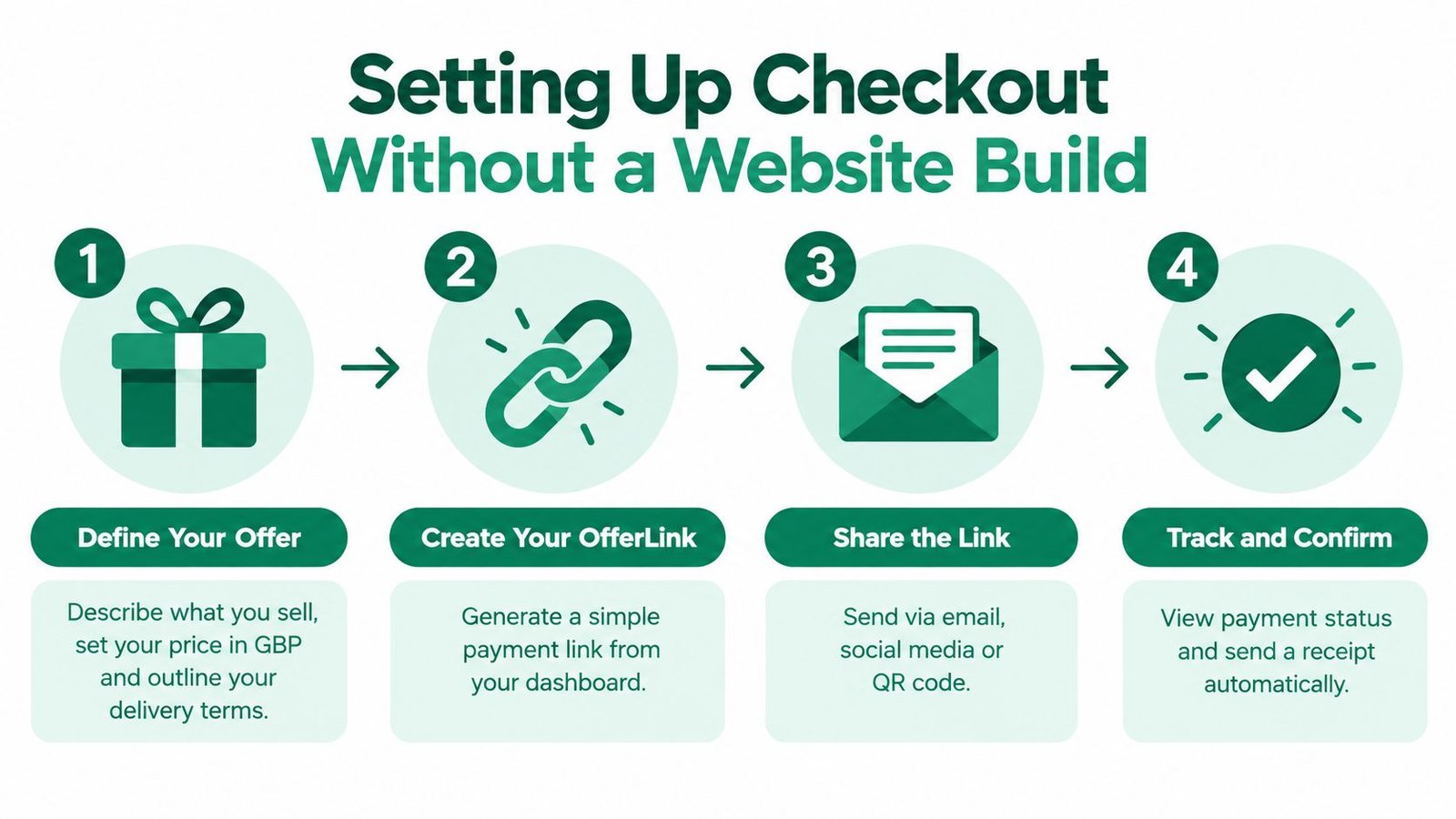
A seller can launch a usable checkout without commissioning a whole website. The main job is to make the offer understandable, the checkout easy to share and the order record strong enough to support fulfilment later.
Start with the offer, not the payment button
Write down exactly what is being sold. For a service, that means the session length, format, who it's for and what's included. For a product, it means the item, any variants, dispatch expectations and whether delivery is tracked. For a digital product or live session, it means the file, access method, event date or replay policy.
That clarity should appear before the buyer reaches payment. The offer title needs to be plain, the description needs to answer likely questions and the fulfilment notes need to stop support messages before they start. A seller saves time later here, because vague offers create back-and-forth that a direct checkout page would have prevented.
Add price, boundaries and fulfilment details
Put the total price where a buyer can see it without scrolling. Include what happens after payment, whether that is instant access, booking confirmation, dispatch or a manual review period. If the offer has exclusions, say so in normal language, because hidden assumptions are where disputes usually begin.
The same goes for optional extras. If a service includes one revision, or if delivery excludes weekends, spell that out. If a live session has limited rescheduling, say it before checkout. That keeps the buyer from feeling surprised after paying, and it gives the seller a clean record if someone later questions the terms.
Publish a page that can travel anywhere
A strong checkout page should work in a bio, a direct message, an email campaign or a QR code. That means the page must be readable on mobile, fast to open and obvious about the next action. It also needs a clear record trail, because messages, delivery or access steps and payment status should all point back to the same order.
A seller dealing with in-person or counter sales may prefer a different flow, and taking payments at the repair counter is a useful reference if the sale starts face to face and still needs a reliable checkout record. For service sellers looking for a structured setup path, how to sell services online is the right companion guide when the offer has to be packaged cleanly before launch.
What Buyers Should See Before They Pay
Buyers decide faster when the page answers the awkward questions in advance. They want to know what's included, what the price covers, when they'll receive it and who to contact if something goes wrong. If those details are buried, support messages rise and confidence drops.
Make the offer readable before checkout
A good offer page should show the business name, contact details, address where relevant, a plain description of the goods or service, the total price, delivery or access timing and any cancellation conditions. For UK sellers, that kind of pre-order information is part of the basic compliance picture, but it also works as buyer reassurance because it removes guesswork. The GOV.UK guidance on selling online sets out the kind of information that should be given before the order is placed, including payment methods, fulfilment arrangements and cancellation terms. GOV.UK guidance on online selling information
If the offer includes a booking, say when confirmation arrives. If it includes a download, say how access is delivered. If it's a physical item, make the dispatch and delivery window visible before the buyer gets to the payment screen.
Use order clarity to reduce disputes
A buyer who sees a clear order summary is less likely to challenge the payment later. That summary should match the offer page, so the service scope, product variant or session details don't change between the pitch and the checkout. Where a buyer fee exists, it should be visible before payment, not discovered after the decision is made.
Buyers don't need perfect detail, they need enough detail to understand what they are paying for and what happens next.
That principle matters most for services and live sessions, where disputes often come from mismatched expectations rather than technical payment failure. A single message trail linked to the order helps both sides, because it gives support a place to answer questions and gives the seller an audit trail if a refund or complaint arrives later.
Keep proof easy to find
Confirmation emails, saved receipts and clear access records should be standard. Buyers keep their own expectations straighter when they can revisit what they bought, when it was delivered and where to ask for help. Sellers benefit too, because a tidy record shortens every follow-up conversation.
For offers that rely on trust, a visible business identity and a consistent support route do more than reduce friction. They make the payment feel like a proper transaction instead of a loose promise.
Fees Currencies Payouts and Staying Secure
The money side of online payments can make a seller feel either in control or constantly behind. The difference usually comes down to checking the right cost points, understanding how currencies and payouts work, and setting security up as a routine rather than an afterthought.
Check the money mechanics before launch
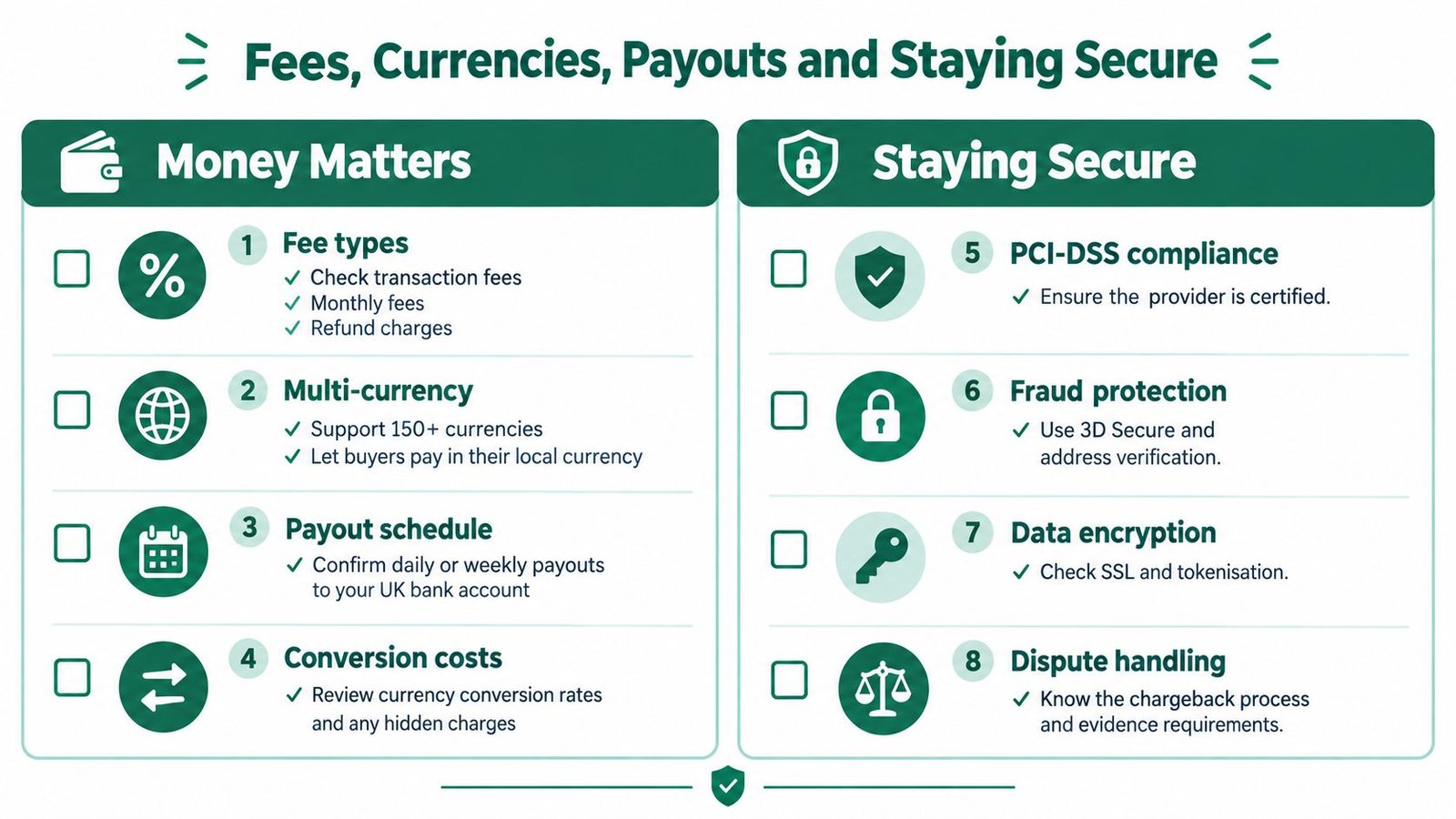
The first question is not just the headline fee. Sellers should look at transaction fees, any monthly platform fees, refund charges, currency conversion costs and how payouts reach the bank. That matters even more if the buyer base crosses borders or if different offer types need different settlement timing.
For sellers who want to work across markets, currency handling should be part of the setup decision, not a later fix. If a platform supports many currencies, the practical question is whether the buyer sees a familiar price and whether the seller can reconcile the payout cleanly afterwards. That is especially useful for creators, consultants and live-session sellers who sell to audiences outside a single local market.
Treat security as checkout infrastructure
Security is not optional because online payments stay attractive to fraudsters. UK Finance reported that remote-purchase fraud losses fell 9% in 2023 to £260.0 million, which was the fifth consecutive annual decline and the lowest since 2014, but the same system still saw £1.17 billion stolen through unauthorised and authorised fraud during 2024. UK Finance also recorded 3.13 million confirmed cases of unauthorised fraud in 2024, with losses of £722 million, and authorised push-payment fraud losses of £450.7 million. UK Finance annual fraud report 2024
Those numbers point to a simple habit. Don't rely on a buyer's goodwill alone. Use secure checkout, clear payment records and a defined route for disputes or reporting. For digital products and live sessions, release access only after confirmed payment. For physical products and services, keep delivery or completion evidence in the order record.
Monitor the right warning signs
A practical setup watches for refund spikes, payment confirmation delays, authentication failures and disputed orders by offer type. If one offer attracts more failed payment attempts, that is a signal to review the page, the authentication flow or the audience fit. If a refund comes in after access has already been granted, the seller needs a revocation or resolution process that is tied to the order record.
The FCA's technical standards also matter here. For remote payments, Strong Customer Authentication is built around at least two independent factors, and the authentication needs to be linked to the amount and payee. The same standards say an authentication code must be accepted only once, which is why replay protection and duplicate-webhook handling belong in the checkout stack. FCA technical standards on authentication
For sellers who want analytics tied to payment and campaign performance, SourceLoop's Stripe-Google Ads tracking guide is a useful example of how payment events can feed better measurement without changing the buyer's experience. That kind of tracking only works properly when the underlying payment and order records are already clean.
Launch Checklist and Next Steps for Steady Sales
The cleanest launches are usually the boring ones. The seller checks the offer text, confirms the payment route, tests a failed payment, opens the support inbox and makes sure every confirmation message points back to the same order record. That's enough to go live without overbuilding.
Launch rule: test the unhappy path before the happy path. A payment that succeeds is useful, but a payment that fails cleanly tells the seller more.
Before sharing the link widely, the seller should check three things. First, the page has enough clarity that a buyer can understand the offer without asking for a private explanation. Second, the checkout confirms payment in a way that matches the order record, not just the browser screen. Third, refunds, partial fulfilment or disputes have a documented route back through the same transaction trail.
After launch, the best habit is to review buyer questions, not just sales volume. Repeated questions usually point to missing details in the offer copy, unclear fulfilment timing or a policy that needs to be written in plainer language. That feedback is valuable because it improves the page and reduces the amount of manual explanation needed for the next sale.
For sellers who want a single checkout link, a structured order record and a simple way to present services, products, downloads or live sessions, AmaJova provides that kind of OfferLink-based selling flow. It suits sellers who want to accept payments online without building a full storefront and who need the offer, payment and fulfilment record kept together. Visit AmaJova to see whether that setup fits the way the next offer should be sold.