
A service business often reaches the same awkward point. A consultant has a repeatable workshop, a designer has a library of client-ready templates, or a retailer has useful buying guidance trapped inside one-to-one conversations. Customers want access without booking a call, while the seller wants to stop explaining the same details in messages. Turning that existing work into a digital product can create a more manageable offer, but only if delivery, buyer expectations and UK compliance are designed together.
The opportunity is already familiar to UK buyers. The online retail market exceeded £125 billion in 2024, and internet sales represented 28% of total retail sales in September 2025, compared with 27.8% in August 2025, according to Mintel's UK online retailing market report. Digital goods sit inside that normalised online buying behaviour, but they still need a clear promise, reliable access and an obvious answer to the question, “What exactly happens after payment?”
Table of Contents
- Understanding Digital Product Delivery
- Creating Your First Digital Offer Link
- Pricing and Legal Considerations for Downloads
- Managing Orders and Fulfilment Efficiently
- Why Simple Links Outperform Complex Stores
- Your Digital Product Launch Checklist
Understanding Digital Product Delivery
A physical seller thinks in parcels. The buyer pays, the order enters a fulfilment queue, somebody picks and packs the item, and a carrier provides the next visible milestone. A digital seller has no box to track, but the buyer still expects an equally concrete journey. If the confirmation page says “your order is complete” while the file is buried in an email, the absence of shipping doesn't feel efficient. It feels unfinished.
That confusion appears frequently when an existing service is digitised. A coach might sell a recorded session but describe it like a booking. A retailer might offer a downloadable care guide but label it as a product requiring delivery. A designer might provide editable files without stating which software is needed. Each offer may be valuable, yet the buyer has to guess whether access arrives by email, through an account, or via a manual message.

Delivery is part of the product
A digital product has at least two components:
- The asset: The PDF, video, audio file, template, spreadsheet, software, prompt pack or other content being sold.
- The access journey: The confirmation, download instruction, account access, licence information and support route that help the buyer use it.
A seller who concentrates only on the asset creates avoidable support work. The offer should state the file format, required applications, whether access is permanent or time-limited, and whether updates are included. Those details also help a buyer distinguish a legitimate purchase from an uncertain download. UK consumer data shows that 62% of UK internet users had downloaded or streamed legitimate digital content, while one in five still accessed some content illegally, as reported by the UK Government's consumer downloading and streaming update.
Practical rule: Treat the delivery instructions as part of the paid experience, not as an afterthought added after the sales copy.
A single access path usually works better than a chain of manual replies. Sellers comparing fulfilment approaches can also use this practical guide to selling digital goods to review common delivery and offer decisions. The useful test is simple: a buyer should know what they bought, where to find it and what they can do with it without contacting the seller for basic clarification.
Creating Your First Digital Offer Link
The first offer link should turn a loose idea into a precise buying decision. This matters even more when the product comes from an existing physical item or service, because the seller already understands the work and may skip details that seem obvious.
Choose the offer type before writing the page
Start by identifying the dominant outcome:
- Download: Use this for a finished file such as a guide, workbook, design pack or spreadsheet. Name the formats and explain how the buyer receives them.
- Digital access: Choose this for a course, resource library, recorded workshop or member-only material. State what access includes and how the buyer reaches it.
- Productised service: Use this when the buyer receives a defined deliverable rather than an open-ended engagement. List the scope, inputs required and expected completion process.
- Live session: Keep this separate from an on-demand product. Include booking or attendance details, what happens if the buyer misses the session, and whether a recording is supplied.
An offer page should answer five questions before checkout:
| Buyer question | Information to provide |
|---|---|
| What is being purchased? | A specific title and outcome |
| What is included? | Files, modules, bonuses or deliverables |
| What is excluded? | Personalisation, software, ongoing support or physical items |
| How is it delivered? | Download, access instructions, booking or a combination |
| What can the buyer use? | Licence, permitted users, duration and redistribution limits |
Write the page as a support document
The title should describe the result rather than the production method. “Editable appointment planning pack for independent salons” gives more buying context than “Salon template bundle”. The description should then show the problem, the contents and the next action in a logical order.
Include the technical metadata buyers need:
- File formats: For example, PDF, DOCX, XLSX, Canva template or video access.
- Compatibility: Identify required applications, account types or devices.
- Version details: State whether the files are current, editable or supplied as a fixed export.
- Usage rights: Explain personal, business, client-facing or team use.
- Support boundaries: Say whether questions cover access only or also implementation.
- Delivery timing: For an instant item, say that access instructions appear after successful payment. For a customised item, describe the next step instead.
AmaJova's digital product examples can help sellers compare how different downloadable and access-based offers are framed. The platform's OfferLink format is designed around the title, inclusions, price and fulfilment or access details, but sellers still need to supply accurate content and terms.
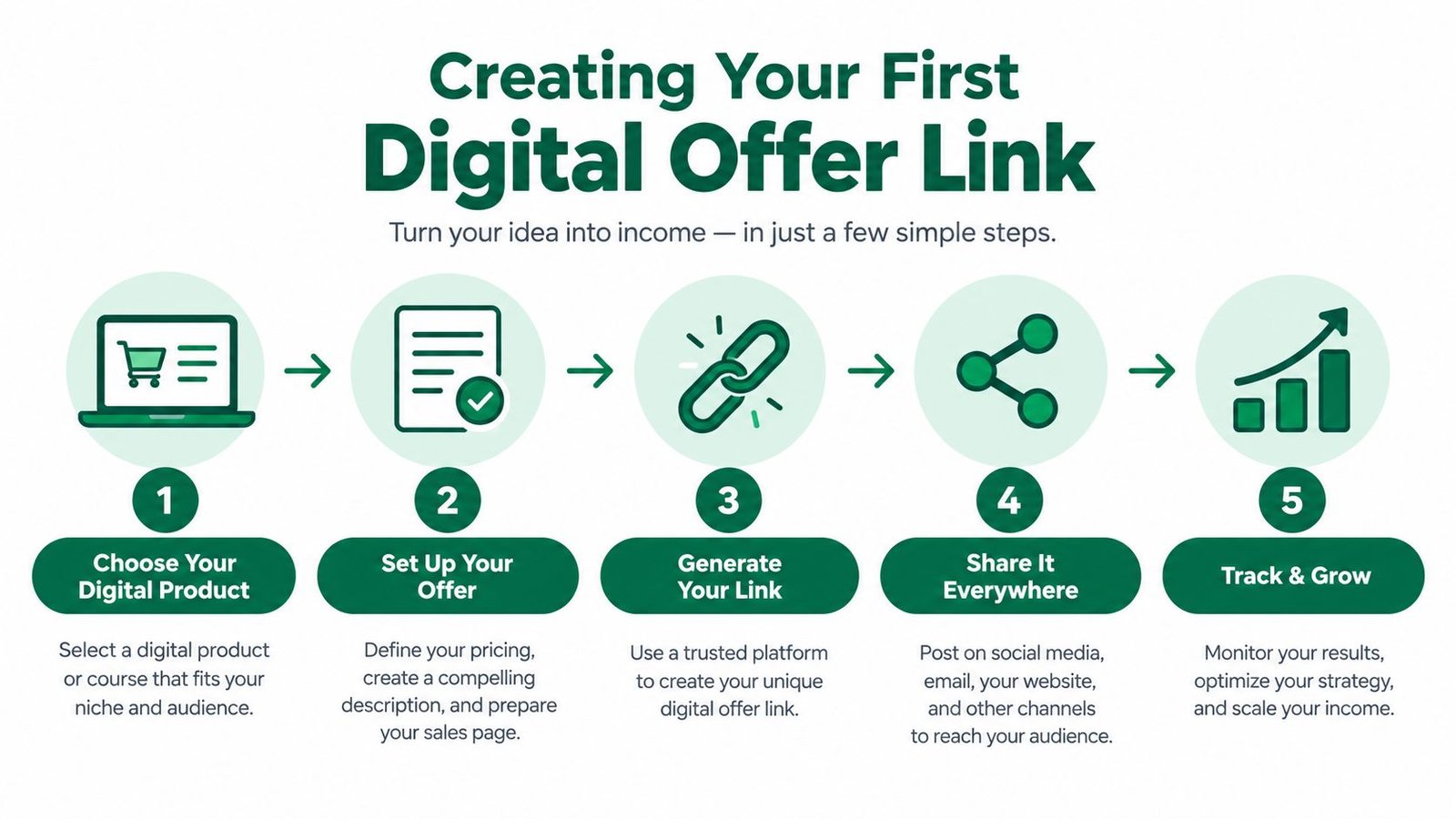
Before publishing, place the link in the channel where the existing audience already pays attention. A service provider might add it to a post-session email, while a retailer might place it beside a related physical product. The link should lead to one complete decision, not a menu that sends buyers back into a large storefront.
Pricing and Legal Considerations for Downloads
A £12 template can generate more support work than a higher-priced product if buyers misunderstand its licence, editing limits or intended use. Pricing and cancellation terms therefore need to be planned together. Set the price according to the outcome, asset depth, support burden and rights granted, not just the number of pages or files.
For an existing service business or retailer moving part of its offer online, the commercial choice also affects fulfilment. A single download is simple to deliver. A bundle may raise the order value but creates more access and version questions. A membership creates recurring revenue while adding renewal, cancellation and update obligations.
Compare the offer models
| Model | Commercial strength | Operational risk |
|---|---|---|
| Single download | Straightforward purchase and delivery | Buyers may misunderstand usage rights or compatibility |
| Bundle | Makes related assets easier to buy together | More files create more access and version questions |
| Subscription or membership | Supports continuing access to updated material | Cancellation, renewal and ongoing content expectations need careful management |
| Digital product plus service | Connects self-serve content with expert help | The seller must separate the product promise from the service scope |
UK consumer rules apply to electronic delivery. Under the Consumer Contracts Regulations on legislation.gov.uk, a consumer buying digital content that is not supplied on a tangible medium normally has a 14-day cancellation period from the day the contract is entered into. The often-used description of a “twelve-day cooling-off period” does not apply to this scenario.
Supply during that period requires express consent to immediate delivery and acknowledgement that the cancellation right will be lost once supply starts. The consent should be visible in the checkout, separate from broad terms and conditions. Record the buyer's choice and include it in the required confirmation. The statutory regulation should be reviewed alongside the actual checkout wording and fulfilment flow.
For digital content supplied during the cancellation period, the consumer bears no cost in specified circumstances, including where express consent was absent, the loss of the cancellation right was not explained, or the required confirmation was not provided, according to Regulation 37 of the Consumer Contracts Regulations. Seek legal advice if the product, delivery method or customer journey makes the position uncertain.
Licensing needs the same precision. State whether buyers may edit the file, use it for client work, share it with a team, resell an adapted version or receive future updates. These rights affect both price and support volume, especially when an existing consultancy turns its working materials into a self-serve product.
Payment and checkout choices also carry trade-offs. Sellers comparing transaction journeys can review PayPal Checkout on Taja AI, while AmaJova's seller protection policy offers another document for reviewing how order issues and protection information are presented.
After the first sale, marketing compliance still applies. Refer to the ICO's direct marketing guidance when separating transactional access messages from promotional communications. Email and text campaigns may also fall under PECR, so post-purchase sequences should provide the appropriate opt-out control.
Managing Orders and Fulfilment Efficiently
The sale isn't complete when the payment notification arrives. The seller still needs to confirm what was ordered, provide access, answer questions, handle a failed download and record any dispute without searching across multiple systems.
A fragmented setup might place payment data in one dashboard, the file in cloud storage, buyer questions in social messages and refund discussions in email. That structure makes simple issues harder to resolve. A unified order record gives the seller one place to verify the item, review the timeline, send an instruction and confirm whether the buyer received the expected next step.
Build a post-purchase operating routine
A practical routine starts with the order record:
- Payment status: Check whether the transaction is complete, pending or subject to a dispute.
- Delivery status: Confirm that the download or access instruction has been issued.
- Buyer messages: Keep questions attached to the relevant purchase instead of moving the conversation into scattered channels.
- Version control: If a file changes, identify which version the buyer should use and how existing customers receive it.
- Completion evidence: Record delivery or access confirmation where the system supports it.
This structure matters for international selling. UK businesses made around £77.8 billion in sales through their own websites to customers abroad in 2021, and digitally ordered sales represented 11.4% of total UK trade that year, according to the Office for National Statistics' 2026 update on UK digital trade statistics. The ONS defines digitally ordered trade as goods or services sold over computer networks from one country to another, which closely matches the way digital products are purchased and delivered.
Cross-border orders add practical questions. The page should make the currency, access method, support scope and permitted use understandable to buyers who may be in different markets. Payment automation can reduce manual work, but it doesn't replace clear records or a defined escalation route. Sellers exploring payment workflow integrations can review Stripe actions as an example of how payment events may connect with operational processes.
Keep support proportional to the offer
A £12 template shouldn't require a bespoke consultation to explain where the file is. A higher-touch course or specialist resource may need onboarding, troubleshooting and update notices. The offer page should set that boundary before payment, then the order record should preserve it after purchase.
AmaJova can be used as one option for connecting checkout, delivery or access steps, messages, payment records and completion tracking to an order record. That approach suits sellers who are converting an existing service or physical-product audience into a structured digital offer without building a separate operational stack.
Why Simple Links Outperform Complex Stores
A full ecommerce store has a legitimate role when a business manages a broad catalogue, complex product options, content-led discovery and repeat browsing. It becomes inefficient when the actual task is narrower, such as selling one workshop recording, one downloadable toolkit or one defined service package.
The store adds work that buyers don't necessarily value. Someone arriving from a social post or a client email usually needs to understand one offer, check the terms and pay. Sending that buyer through a homepage, category page, product filter and account journey introduces more places for unclear copy, slow pages or broken links to interfere.
Compare the operating burden
| Full storefront | Single offer link |
|---|---|
| Useful for catalogue browsing | Useful for one focused decision |
| Requires broader navigation and maintenance | Concentrates copy, price and fulfilment details |
| Can support multiple product journeys | Keeps one campaign destination consistent |
| Often needs more technical configuration | Can sit alongside an existing website or social profile |
A single link also makes campaign measurement easier to reason about. The seller can change the message in the post while keeping the destination focused, or create separate links for distinct audiences without redesigning the entire shop. That doesn't guarantee conversion, but it reduces the number of variables between interest and payment.
Mobile behaviour deserves particular attention. UK ecommerce data recorded an average conversion rate of 2.23% in August 2026, an average order value of £129.23, and 63.7% of transactions from mobile, with 41.3% international demand, according to IRP Commerce market data. Sellers should treat those figures as a market benchmark, not a promise for an individual offer, and test the actual page on a small screen.
The practical test is whether a buyer can see the product outcome, inclusions, price and delivery route without zooming or hunting. If a custom store provides that experience and supports the catalogue, keep it. If it mainly creates maintenance for a single offer, a professional offer link can be the more disciplined choice.
Your Digital Product Launch Checklist
A reliable launch starts with a buyer's-eye test. Open the offer as a customer would, then check the route from first click to payment, delivery and support.
- Define the outcome: State the problem solved and identify the intended buyer.
- List the contents: Name every file, module, bonus and exclusion.
- Test access: Check confirmation messages, download links and login instructions on mobile and desktop.
- Document the licence: Explain editing, sharing, commercial use, resale and update rights.
- Set the support boundary: State what help is included and where customers should send requests.
- Configure consent: If you deliver digital content during the cancellation period, obtain express consent and the required acknowledgement before delivery, as covered in the Consumer Contracts Regulations section above.
- Review marketing permissions: Separate service messages from promotional emails, and provide a clear way to opt out of marketing.
- Check tax responsibilities: Monitor taxable turnover and obtain professional advice about VAT registration. The standard UK VAT registration threshold is £90,000 of taxable turnover in any rolling 12-month period. Registration may also be required if the business expects taxable turnover to exceed that threshold in the next 30 days, according to HMRC's VAT registration guidance.
- Run a support test: Ask someone unfamiliar with the product to find the files and explain permitted use without assistance.
A small test audience can expose broken links, unclear permissions and support gaps before a wider launch. Fix those issues, then publish the offer where the existing audience already looks. A narrow transformation is usually easier to explain and fulfil than a large catalogue.
AmaJova lets sellers turn digital products, services, physical products and live sessions into structured OfferLinks with checkout, fulfilment details and order-connected communication. Sellers packaging existing expertise or product knowledge into one focused buying journey can visit AmaJova and create an offer designed for clearer delivery.