

Selling a colour grading course as a collection of cinematic looks is tempting, but it puts the least dependable part of the work at the centre of the offer. A preset can make a still attractive while leaving the sequence inconsistent, the client's notes unresolved and the export unsuitable for delivery. A stronger course teaches workflow literacy, the ability to explain, reproduce, revise and deliver a grade.
For an independent instructor, that changes the product being sold. The offer becomes a defined learning outcome supported by practice media, assessed work and clear limits on feedback, rather than an expanding library of software demonstrations.
Table of Contents
- What Buyers Expect from a Colour Grading Course
- A Six-Module Finishing Curriculum
- How to Plan Lessons Demos and Checks
- Price Each Colour Grading Course Format
- Tips for Modest Setups and Clear Terms
- Publish the Offer Before You Market It
What Buyers Expect from a Colour Grading Course
Looks and tool tours make appealing sales-page material. Buyers preparing for paid work need something more useful: a finish they can defend when an editor questions a mismatch or a director asks why a scene feels different.
The colourist's job involves refining the picture, matching shots, balancing saturation and luminance, and shaping the look around the director's and director of photography's intentions. ScreenSkills' colourist career guidance describes these responsibilities and identifies several entry routes, including art and design, photography, graphic design and computing, alongside a Level 4 post-production technical-operator apprenticeship in England and Level 3 Creative and Digital Media pathways in Northern Ireland and Wales.
There isn't a single mandatory certificate that a course seller should present as the gateway to the profession. A credible offer explains what learners will practise and demonstrate, without confusing course completion with professional readiness.

Software is the working environment, not the outcome
Buyers should know whether demonstrations use DaVinci Resolve, applications within Adobe Creative Cloud, or a defined combination. The listing should identify the relevant application and edition, rather than promising that every workflow transfers unchanged between tools.
The paid difference is measurable control of exposure, contrast, saturation and continuity, combined with judgment about genre, period, lighting and advertising briefs. A warm interior shouldn't automatically become neutral because the instructor demonstrates white balance.
Skin provides a useful teaching example because a face can look plausible in isolation but change noticeably across a cut. Image Studio's explanation of creating consistent skin tones in film can support that discussion, while the practical exercise should require learners to compare faces across the whole scene.
Choose a learner before choosing lessons
The instructor should select a primary outcome rather than selling the same promise to everyone:
- Junior finishing assistant: Emphasis on media preparation, conform accuracy and dependable handovers.
- Freelance short-form colourist: Emphasis on interpreting briefs, matching mixed footage and managing revisions.
- Editor grading their own work: Emphasis on a controlled finishing process within an existing editing practice.
The curriculum below assumes a freelance short-form colourist who already understands basic editing. That boundary leaves room for purposeful grading practice instead of forcing introductory editing, advanced finishing and business coaching into the same purchase.
A Six-Module Finishing Curriculum
A publishable curriculum needs a visible connection between the learner's task and the evidence used to assess it. Software controls belong inside that structure, not in place of it.
Senior colourist Peter Doyle's FilmLight interview emphasises technical understanding and colour science, alongside practical exposure to set lighting. For teaching, that means learners should understand why a cinematographer lit a face unevenly before attempting to flatten the difference with a correction.
Six-module colour grading curriculum
| Module | Learner task | Assessed outcome |
|---|---|---|
| Camera test and ingest | Read metadata, set the input transform, note gamma and gamut | Transform notes and legal-range scopes saved |
| Conform and primary balance | Match the offline cut, set exposure and white balance | Neutral primaries that hold across the scene |
| Shot matching | Compare adjacent shots on waveform, parade, vectorscope and a still reference | Continuity with no obvious cut jump |
| Secondaries and skin | Track windows and qualifiers for skin and problem areas | Skin continuity without halos or pumped saturation |
| Creative look | Grade to a written genre or period brief | Look notes that cite the brief, not a preset name |
| HDR, SDR and mastering | Trim HDR to SDR, review on stated targets, export after a timeline change | Valid masters plus a change log |
Each module needs a lesson note naming the exercise file, required evidence and pass standard. A task such as correcting exposure is too open-ended on its own. The note should identify the reference shot, the intended lighting relationship and the evidence that will demonstrate a successful match.
Every exercise should record display assumptions, gamma and gamut transforms, legal-range checks and the delivery specification. These records let another person reopen the project without guessing which viewing conditions or output settings informed the decisions.
Assess sequences, not a showreel montage
The portfolio should contain a short narrative sequence, a mixed-camera scene and an HDR-to-SDR trim pass. Each exposes a different weakness: narrative material tests continuity, mixed-camera material tests interpretation of sources, and the trim pass tests whether the learner can adapt an image without damaging its intent.
Assessment should cover exposure consistency, neutral balance, skin-tone continuity, highlight management and technically valid export. Neutral balance doesn't mean removing deliberate lighting colour. It means establishing a controlled starting point and explaining intentional departures from it.
A usable marking checklist asks whether the learner:
- Preserved the lighting relationship: Faces and backgrounds retain the intended hierarchy.
- Controlled transitions: Adjacent shots don't introduce an unexplained brightness or colour jump.
- Protected the image: Keys, tracking and highlight adjustments remain stable during playback.
- Delivered correctly: The exported file matches the assigned specification and survives reimport checks.
A technically valid export and an explained creative decision provide stronger evidence than an attractive frame with no supporting project notes.
A completion certificate should describe the achievement accurately. Before choosing its format, an instructor can compare digital and static certificates through CertSeal, while keeping the assessed portfolio as the main evidence of competence.
For packaging, the guide to selling online courses can help organise curriculum, resources and access into a defined offer. Each module row should become a lesson block with a downloadable practice clip and a marked checklist, not an invitation to add unrelated tutorials indefinitely.
How to Plan Lessons Demos and Checks
A learner watching an uninterrupted screen recording can mistake recognition for competence. A repeatable lesson needs a decision, a demonstration, an attempt and evidence that the attempt worked.
London colourist Adam Inglis describes comparing earlier episodes to maintain consistency. That's a useful teaching principle: the relevant reference may sit elsewhere in the project, not merely beside the current shot.
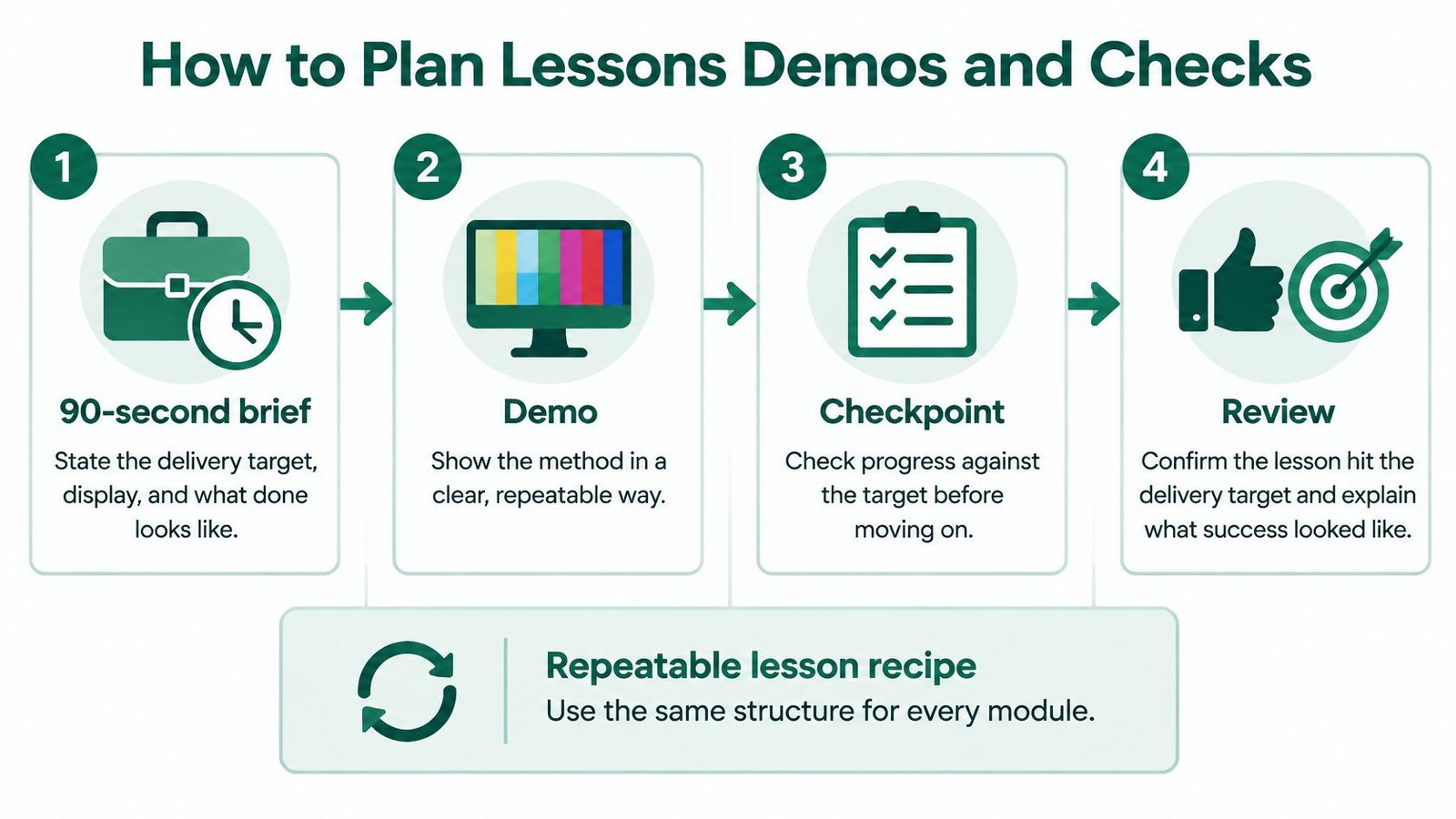
A repeatable demonstration recipe
The following timings are proposed teaching limits, not claims about an ideal learning duration. A 90-second opening brief and demonstrations kept under 12 minutes provide a practical starting structure.
State the delivery target. The opening brief identifies the intended output, the viewing display and what a finished submission contains. Without that boundary, learners may optimise for an attractive viewer image rather than the assigned master.
Establish the source before adjusting it. The instructor verifies metadata, confirms the input transform, then balances exposure and white balance on a reference shot. A common slip is correcting the appearance of an incorrectly interpreted source with extra grading nodes.
Demonstrate matching with named evidence. Waveform, RGB parade, vectorscope and a reference still should appear during the comparison. The instructor names the trace being watched and explains its relevance, rather than moving controls while saying the image feels better.
Show a secondary correction failing. A tracked window or qualifier should deliberately reveal a halo, drifting mask or skin shift before the fix. Learners then see why a correction that works on a paused frame may fail during movement.
Review against the stated targets. The same frame is checked at the assigned SDR target and, where relevant, the HDR target. The instructor distinguishes a genuine image problem from a change introduced by the viewing path.
Break the timeline deliberately. A replacement shot or edit change creates a conform task before export. This prevents the lesson from implying that grading ends when the colour page looks finished.
Require a fault diagnosis and change log. Each learner resolves a simulated problem such as offline media, mismatched frame rate, an incorrect gamma tag or illegal levels. The log records the symptom, cause, correction and verification.
Make feedback actionable
All learners should receive the same practice media for the assessed attempt. Otherwise, an instructor may spend the review comparing camera limitations instead of marking the skill being taught.
The feedback should identify the failing checkpoint, point to the relevant frame or timecode, and describe the next action. For example, a skin correction that breaks when the subject turns needs tracking or key refinement, not a general comment that the colour feels unnatural.
Colourists may also handle ingest, conform and final renders. A course confined to grading controls leaves learners unprepared when media fails to relink or a revised cut arrives.
Completion rule: If a lesson has no saved scope, no note and no export, it isn't finished.
The instructor should assess the checklist rather than personal taste. A restrained commercial look and a stylised narrative look can both pass when each fulfils its brief and remains technically controlled.
Price Each Colour Grading Course Format
| Format | What is included | Capacity cue | Pricing logic |
|---|---|---|---|
| Self-paced download | Lessons, practice media, notes, and only the LUTs or presets the lessons use | Sold repeatedly, fixed file list | Lowest cash price; state whether UK VAT is included |
| Live clinic | A proposed 90-minute session covering a sequence, a review and a stated feedback turnaround | A learner or a very small group | A fraction of the cohort fee |
| Four-to-six-week cohort | Weekly live session, feedback stages, a portfolio project | Only as many as the instructor can mark on time | Price from teaching plus marking hours |
| Mentoring add-on | A proposed package of two to four extra reviews and a change-log note | Sold per learner, not bundled by default | Optional extra, never required to pass |
These are proposed package structures, not market price benchmarks. The instructor should price the promise, not the software, and make each format's exclusions as visible as its inclusions.
A download should exclude individual marking unless that work is explicitly included. A clinic should exclude unrestricted footage submissions and ongoing revisions; a cohort should state its feedback deadline and project boundaries. Mentoring shouldn't become a hidden requirement for finishing the core lessons.
Calculate capacity before setting the fee
The instructor should estimate preparation, live teaching, marking, administration and support separately. Reusing a demonstration doesn't remove the time needed to inspect a learner's project, explain a problem and check the revision.
A workable capacity rule is:
Available marking time divided by marking time per learner sets the enrolment ceiling.
That ceiling should include room for missing files, clarification messages and resubmissions. An instructor who fills every available hour with scheduled teaching has left no capacity for the work buyers expect afterwards.
The cohort fee should cover the defined teaching and marking commitment. The clinic can then be priced as a smaller intervention, while the download remains the lowest cash-price entry point with the clearest file list.
The guide to pricing services can support that scope-based calculation. For ongoing oversight, freispace's guide to building a monthly studio reporting routine offers a useful context for reviewing course income alongside delivery costs and instructor time.
Treat tax as a format constraint
Under HMRC's guidance on digital services supplied to private consumers, UK VAT generally applies to relevant digital supplies to UK customers, subject to the seller's circumstances; UK VAT usually doesn't apply to customers outside the UK, although obligations may arise in the customer's country.
The checkout process should collect and retain appropriate customer-location evidence and clearly indicate whether the displayed price includes VAT. Customer location matters, not the instructor's business address or the currency selected.
Substantial live teaching can receive different treatment from electronically supplied lessons, LUTs or presets. A mixed package should therefore be checked with HMRC or a qualified adviser rather than assigned a tax treatment solely because the sales page calls it a course.
Tips for Modest Setups and Clear Terms
A bright window behind the display can distort a learner's judgement before any grading control moves. An unstated viewing target, a laptop used in changing café light or unchecked output levels can undermine otherwise careful work.
The instructor should publish an achievable minimum setup, while distinguishing learning conditions from professional mastering conditions. A modest setup can support structured practice, but it shouldn't be described as equivalent to a verified reference-monitoring environment.
Publish equipment expectations without overselling them
The setup list should include:
- A suitable computer: It must run the stated host software and play the supplied practice media, with proxy instructions where appropriate.
- A checked display: Basic calibration is preferable to untouched factory settings, with limitations clearly acknowledged.
- Controlled room light: Direct glare and large changes in ambient illumination should be avoided during comparison.
- A declared viewing target: Learners need to know which output the exercise is intended to produce.
- Call equipment: Headphones can serve as a fallback for client calls, but they have no role in judging the picture.
Panels and reference monitors help, but they aren't prerequisites for the first paid module. An instructor can teach source interpretation, organised projects and scope-based checks without implying that a home display can verify every delivery requirement.
HDR exercises need an additional boundary. Without suitable monitoring, a learner can practise transforms, trim organisation and export checks, but shouldn't be told that the image has received a fully verified HDR visual assessment.
Downloadable practice media prevents a weak connection from interrupting every attempt. Live dates should state UK time clearly and accommodate regional participation without assuming that attendance requires access to a Soho suite.
Separate dissatisfaction from defective supply
A learner changing their mind isn't the same issue as a lesson failing to arrive or a supplied file failing to meet the contract. The seller's terms should address these situations separately rather than relying on a blanket no-refunds statement.
Under section 45 of the Consumer Rights Act 2015, where a breach gives the consumer a refund right, it covers the affected digital content rather than automatically extending to unaffected content; an agreed refund must be made without undue delay and within 14 days, normally through the same payment method and without a refund fee.
That is general information, not advice for every contract. Change-of-mind rights, mixed service packages and particular supply arrangements need appropriate consideration, and statutory rights shouldn't be replaced by an instructor's preferred policy.
The course page should identify the files supplied, access method, support route and response when content fails to meet the agreement. It should also distinguish an access problem from a learner's incompatible setup without assuming that every technical fault is the buyer's responsibility.
Clear terms describe the remedy process as carefully as the sales promise.
Publish the Offer Before You Market It
A sales page should let a buyer understand the work, pay for the chosen format and identify the next action without reconstructing details from social posts. Attractive before-and-after images can support the offer, but they can't substitute for its scope.
Services can include coaching, design, consulting, classes and more. A grading clinic belongs within that broader service model: the instructor sells a defined intervention, not unlimited access to their expertise.
Build the page in buying order
The page should present the following information in this order:
- Course title and intended learner. Name the role, starting knowledge and practical outcome.
- Module names. Use the published curriculum rather than a vague promise to cover everything.
- Software and setup. Identify the application, relevant edition and equipment expectations.
- Files received. List lessons, practice footage, notes and any LUTs or presets used.
- Live arrangements. State dates, time zone, attendance expectations and whether recordings are supplied.
- Feedback process. Explain the submission method, review allowance and turnaround.
- Exclusions. Identify work the fee doesn't cover, including project rescue, additional footage or ongoing client support.
- Access instructions. Describe the confirmed next step after payment in a plain sentence.
A short FAQ should resolve remaining practical questions, such as accepted practice-media formats and how a sequence should be prepared for review. It shouldn't become a hiding place for restrictions that belong beside the price.
Confirm the delivery path before accepting payment
Before publishing an access promise, the seller should verify the actual workflow for downloads, scheduling and messages. This applies to AmaJova as well as any other sales platform; the listing should describe only the delivery features confirmed for that offer.
The guide to selling services online can help an instructor frame the clinic as a bounded service. A download and a clinic should each have their own inclusions and price, even when presented as related options.
For international buyers, the offer should state the applicable VAT position clearly. Currency choice isn't a tax solution, and neither the course title nor a checkout setting replaces checking the supply's treatment.
The launch should avoid job guarantees and unsupported success rates. A practical starting plan is to publish either the download or the proposed 90-minute clinic this week, then aim to book the first three learners before expanding into a cohort. Their completed submissions can reveal unclear instructions, excessive marking time and gaps in the offer's boundaries.
AmaJova offers a clear OfferLink for services, digital products and live sessions, with secure checkout and order-connected communication. An instructor ready to package a grading download or clinic can visit AmaJova to define the inclusions, price and confirmed delivery steps before sharing the offer.