
A buyer is on a phone, thumb over the payment button, looking at a padlock and a price. They have chosen a product, a download, a service or a live session, and they expect two things: that the card details stay private, and that the seller will truly deliver what the page promised. That second expectation is where many checkouts fail without warning.
A locked door stops a stranger walking in. It does not, on its own, prove who you dealt with or what was agreed. Secure checkout has to do both jobs.
Table of Contents
- What Secure Checkout Means in Practice
- Why Secure Checkout Matters to Sellers and Buyers
- Security and Trust Elements to Build Into Checkout
- Common Threats and How to Mitigate Them
- How the Payment Flow Should Run Safely
- Consumer Rights and Records to Keep After Payment
- How AmaJova OfferLink Checkout Handles These Points
- Check Your Checkout Before You Go Live
What Secure Checkout Means in Practice
From the buyer's side, the padlock is the whole story. From the seller's side, secure checkout is the set of controls that runs from the moment someone chooses an offer until the seller is accountable for what was paid for. Encryption is only the middle of that journey.
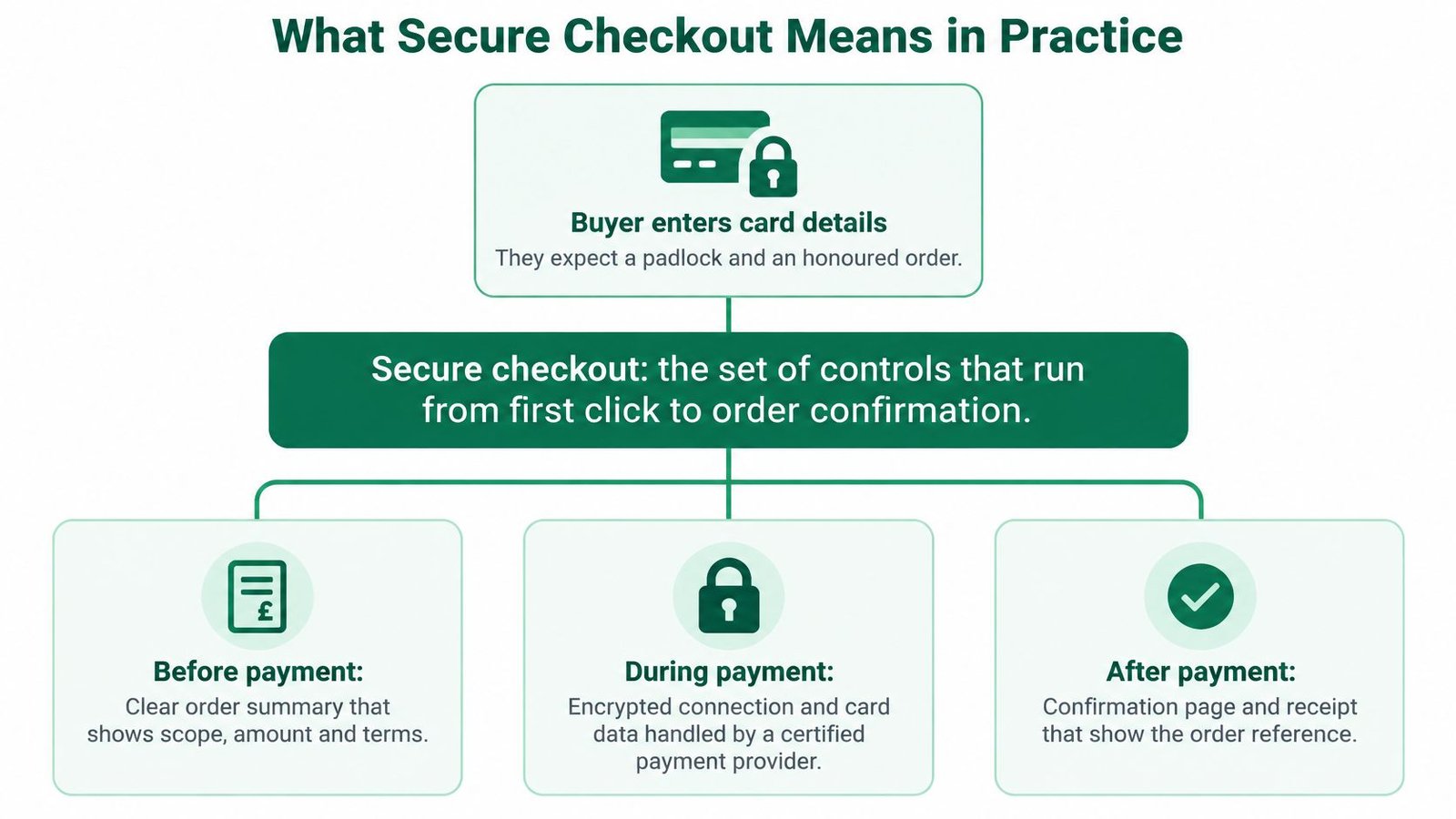
It does three jobs. It protects payment data while it travels. It checks that the person paying is allowed to use that account. It keeps a clear record of what was bought, so a later argument has something solid to stand on.
| Layer | What It Protects Against | What the Buyer Sees | What the Seller Controls |
|---|---|---|---|
| Encrypted transmission | Card and personal data intercepted in transit | HTTPS address and padlock | Valid certificate and HTTPS on every checkout page |
| Strong customer authentication | Payments made without the account holder's approval | Bank app or one-time code prompt | Working with the payment provider's flow, not obstructing it |
| Fraud screening | Suspicious or mismatched orders | Usually invisible, occasionally an extra check | Which order data is collected and how mismatches are reviewed |
| Pre-payment transparency | Misunderstood scope, price or fees | Full order summary before paying | Accuracy of the offer page, inclusions, currency and fees |
| Order record | Disputes without evidence | Receipt and order reference | Consistent messages, delivery or access records |
| Post-payment protection | Non-delivery and unauthorised use | Clear route to report or dispute | Cancellation, refund and dispute handling |
A fully encrypted page can still fail a buyer if the offer was vague or the seller cannot be identified.
Why Secure Checkout Matters to Sellers and Buyers
Fraud isn't a problem reserved for large retailers. The UK Government's Economic Crime Survey 2024 found that in 2024, 27% of UK businesses with employees, about 389,000 businesses, experienced fraud in the preceding 12 months. A solo seller sharing a payment link is in the same environment.
Most of the card risk sits where the plastic never appears. UK Finance's half-year fraud figures for 2024 put estimated UK e-commerce card fraud losses at £145 million, up 12% on the first half of 2023, inside a wider remote-purchase total of £193.7 million.
What sellers feel first
A weak checkout shows up as chargebacks, hours lost answering "I never got this", and buyers who abandon a page that looks unfinished. One disputed live session can wipe the margin on several clean sales, and a public complaint travels further than the original offer.
What buyers are trying to avoid
Buyers lose money, get charged for something that never arrives, and then struggle to prove what was agreed. A receipt that only shows an amount and a date doesn't answer who was paid, what was included, or when the session was meant to happen.
Imagine a buyer books a paid coaching session after a message from a display name that is one letter off the seller's. The bank approves the payment, but the actual seller never sees the booking. The card check passed. The identity and the order record did not.
Practical rule: Clear terms and a recognisable seller name cut hesitation and cut risk at the same time.
Security and Trust Elements to Build Into Checkout
Build the page in the order the buyer meets it. Each item below is one control, and each one fails if the buyer has to guess.
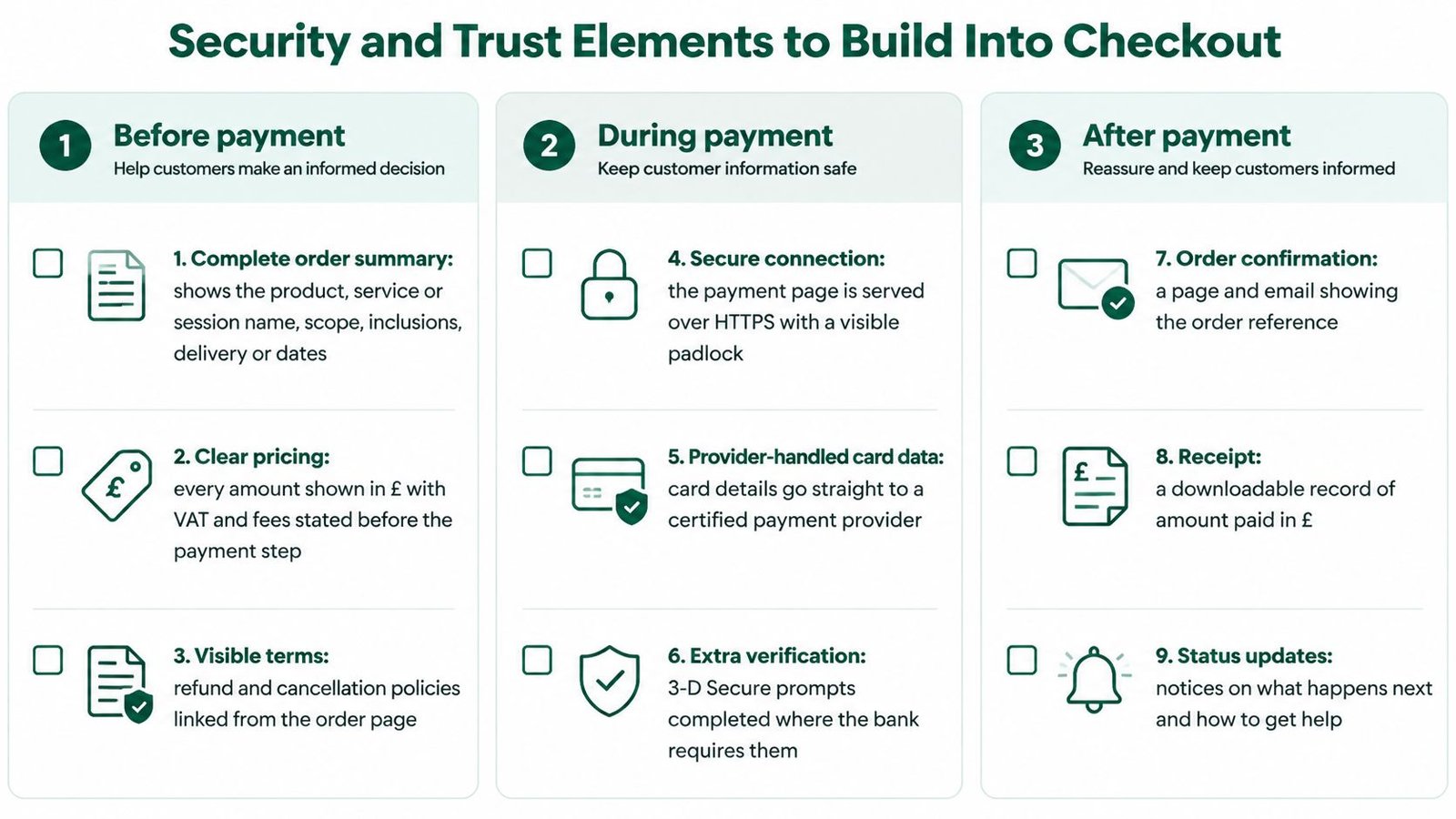
Before the buyer pays
- Complete order summary. Show the product, service or session name, the scope, what is included, when delivery or access happens, the price, the currency and any fee, so the total is visible before payment.
- Recognisable seller name. Use the name the buyer already knows, and back it with a seller verification route rather than a display name that could be copied.
- HTTPS on every checkout page. A valid certificate on the offer page and the payment step stops card and personal data being read in transit.
- A visible way to report a problem. Put a contact or report route on the page, so a worried buyer doesn't hunt through social messages.
Card data shouldn't sit on the seller's own server. A regulated payment provider should collect it, and sellers who host the surrounding site can use a plain guide to understanding PCI hosting responsibilities so the shop page isn't storing numbers it was never meant to hold without anyone noticing.
At the payment step
- Labelled fields and plain errors. Say which field failed and how to fix it, instead of a generic "something went wrong".
- One submit action. Warn against a second tap while the first is still processing, which is how duplicate orders start.
- Payment methods people recognise. Familiar card and bank options reduce the urge to pay a stranger by a side channel.
- The provider's own authentication screen. Leave the amount and the payee visible. Hiding them inside a frame defeats the check.
For buyers who don't use a mouse
A 2025 ecommerce accessibility audit of major sites in the UK and several European markets found that only a minority reached a score where users could finish checkout without critical barriers, and the review included payment pages. The gap isn't only colour contrast.
- Keyboard operation. Every field, link and button must work without a pointer.
- Labels and status messages. Screen readers should announce errors and success, not silence.
- Time limits that can be extended. A banking-app hop shouldn't expire the order with no warning.
- A recovery path. After a failed or interrupted check, say whether money moved, and never ask for card details in chat.
After payment
- On-screen confirmation. Show an order reference and a link to the order record before the buyer closes the tab.
Common Threats and How to Mitigate Them
The threat many sellers underestimate isn't a stolen card. It's a buyer who approves the payment themselves because someone lied to them. UK Finance reported £576.4 million in authorised push payment fraud losses in 2025, up 19% year on year, across 248,070 cases, with 66% of cases starting online. Banks reimbursed £354.3 million, which is 61% of losses, so reimbursement isn't a promise in every case.
Payment security stops an unauthorised charge. Transaction accountability is what remains after a willing, but deceived, approval: who was paid, what was promised, and how to report it. A privacy playbook for enterprise compliance teams is a useful companion here, because the order record holds personal data that still needs a lawful, limited purpose after the sale. AmaJova's privacy information is one place a seller can point buyers who ask how order data is handled.
| Threat | How It Shows Up | Main Mitigation |
|---|---|---|
| Card-not-present fraud | Stolen card details used for an online purchase | Authentication where required, fraud rules, checks for mismatched billing and delivery data |
| Account takeover | Reused logins used to change account or payout details | Strong login protection and alerts on changed contact or payout details |
| Page tampering or skimming | Checkout script altered to capture data | Limit third-party scripts and monitor the checkout page for changes |
| Impersonated seller | Fake offer page or message copying a seller's name | Verified seller identity, consistent naming and a reporting route |
| Authorised push payment scam | Buyer approves a transfer to a fake payee | Clear payment method, no bank-detail changes through chat |
| Payout detail fraud | Seller funds redirected to a different account | Confirm payout changes through a separate channel and pause until verified |
| Friendly fraud | Buyer disputes a delivered order or service | Clear scope before payment and dated delivery or access records |
| Fulfilment disputes | Buyer says the item or session was not provided | Timestamped messages, delivery steps and completion tracking |
How to tell whether the controls work
Don't judge the setup by the padlock alone. Track whether authentication really runs, how often buyers dispute orders, how often genuine buyers are declined, and how quickly a suspicious payout change is paused. A page can be encrypted and still leak money through a changed bank account that nobody checked.
State in the offer, in plain words, that bank or payout details are never changed through chat. Social engineering often starts after the first successful payment, once the buyer already trusts the thread.
How the Payment Flow Should Run Safely
Treat the payment as a sequence. Each step exists because the previous one can be faked on its own.
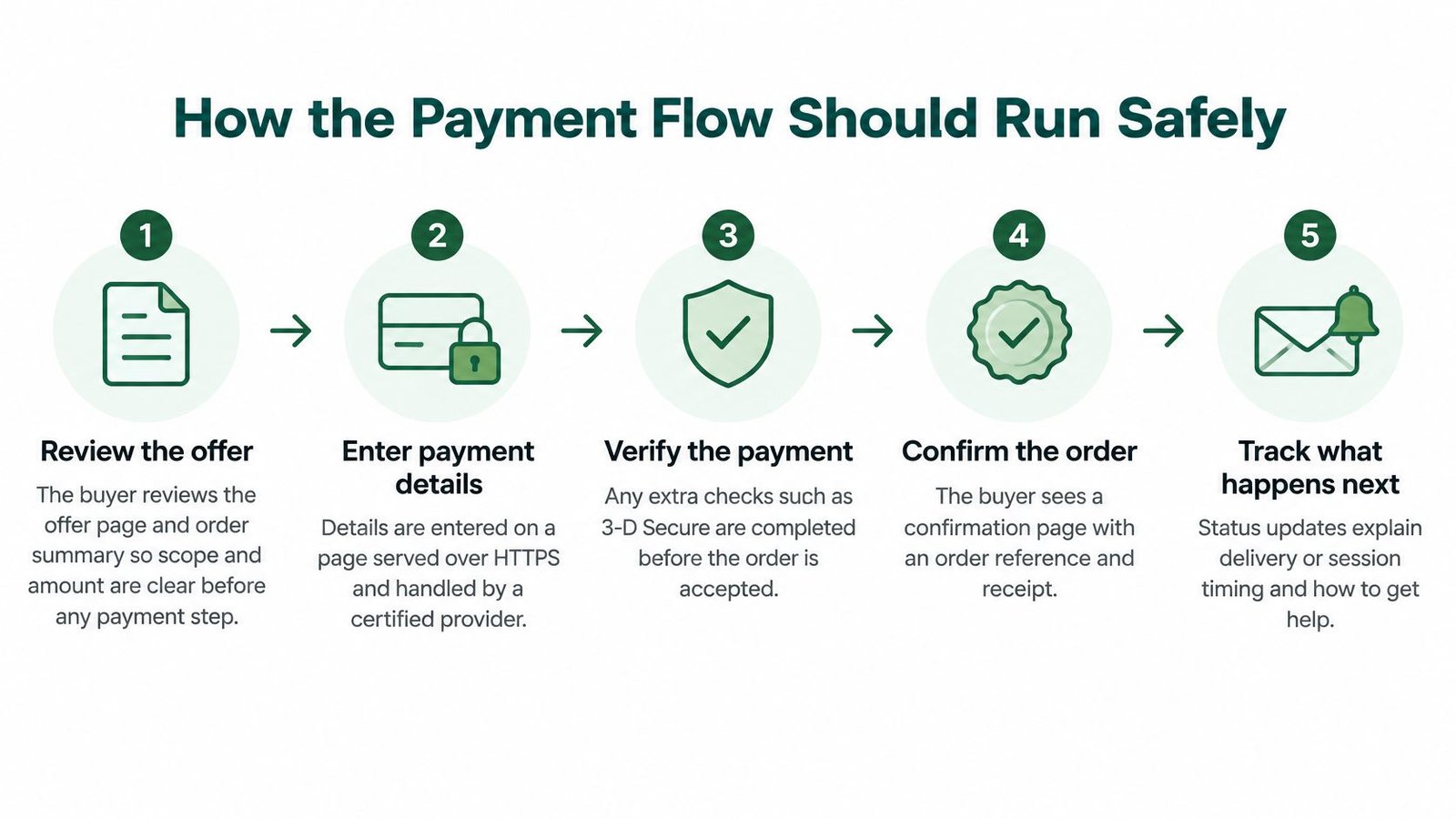
- The buyer reviews the offer. The order summary shows scope, inclusions and amount before any card field appears. A buyer who can't see the total isn't consenting to it.
- Payment goes through the provider. The seller's page or link doesn't collect or store raw card numbers. The provider's fields do that work.
- Strong customer authentication runs where it is required. It uses at least two independent elements from different categories: something the payer knows, something they possess, or something they are. Compromise of one factor must not grant access to the other.
Under regulation 100 of the Payment Services Regulations 2017, a payment service provider must apply strong customer authentication when a user accesses an online payment account, starts an electronic payment, or takes a remote action that may involve payment fraud or other abuse. For a remote electronic payment the payer starts, that authentication must dynamically link the transaction to a specific amount and a specific payee. Checkout design has to let that flow run, and it must not hide either figure.
- Exemptions stay with the provider. A lower-friction path is acceptable only where the provider has applied a permitted exemption and fraud controls still work. Don't invent a skip.
- The result is confirmed on the server. A browser redirect can be replayed or interrupted. The order should wait for the provider's server-side status.
- One order identifier holds the outcome. Store the transaction status and the authentication status against that single reference, then show it to the buyer.
A confirmation that only says "paid" leaves the buyer guessing. Specialist post-purchase pages, such as a guide to next steps after purchasing cyber protection, show the standard worth copying: what was bought, what happens next, and where to get help. The detailed rules on authentication and exemptions sit with the regulations and with the provider's own setup, so sellers should confirm their configuration with that provider or a qualified adviser rather than assuming a default is enough.
Consumer Rights and Records to Keep After Payment
For most UK distance sales of goods, the clock starts when the parcel arrives. GOV.UK guidance on online and distance selling says buyers can cancel without giving a reason within 14 days after receiving the goods. If the seller never tells them about that right, the period can run on by up to 12 months. Once the information is finally given, the buyer has a further 14 days.
What the order record has to hold
The checkout should show the product, the delivery expectation and the cancellation terms before payment. Leaving that to a support inbox means the statutory clock may already have moved.
| Obligation | Rule in Summary | Where to Check |
|---|---|---|
| Cancellation right, UK distance sale of goods | 14 days after receipt, no reason needed | GOV.UK online and distance selling guidance |
| Extended cancellation period | Up to 12 months if cancellation information was not given, then 14 days once it is | GOV.UK online and distance selling guidance |
| Refund after cancelled order | Within 14 days of receiving the returned goods | GOV.UK accepting returns and giving refunds |
| Customer return period | Generally 14 days from notifying the seller of cancellation | GOV.UK accepting returns and giving refunds |
| VAT on digital services to UK consumers | Generally liable to UK VAT; treatment depends on the supply and customer location | HMRC guidance on digital services to private consumers |
GOV.UK's returns and refunds guidance says the seller must refund within 14 days of receiving the returned goods, and must refund the original standard delivery cost. The customer generally has 14 days from telling the seller to send the goods back. Return postage can fall on the customer where that was made clear before purchase, so the pre-payment summary should say so.
Digital sales aren't a VAT-free shortcut. HMRC's guidance on digital services to private consumers says UK businesses supplying those services to UK private consumers generally make supplies liable to UK VAT. Sellers still need to identify what is being supplied and where the customer is, and confirm the treatment with HMRC or a qualified adviser when the facts aren't straightforward.
Accountability after an approved payment
A payment receipt doesn't prove who received the money, what was promised, or when a live session was due. Keep the offer page as it was sold, the order summary, the message thread and the delivery or access log. Buyer protection information belongs next to that record, so a report doesn't depend on a deleted chat.
These rules cover consumer distance contracts and they have exceptions. Services and live sessions can follow different cancellation rules from physical goods. This is general information, not advice for a particular sale, and sellers should check how the rules apply to their own goods and process.
How AmaJova OfferLink Checkout Handles These Points
An OfferLink is a single offer page with checkout, not a substitute for the seller's own accuracy. Nothing here is a guarantee of a fee, a refund outcome or a payout date. Those sit in AmaJova's current terms, and they should be read before anyone relies on them.
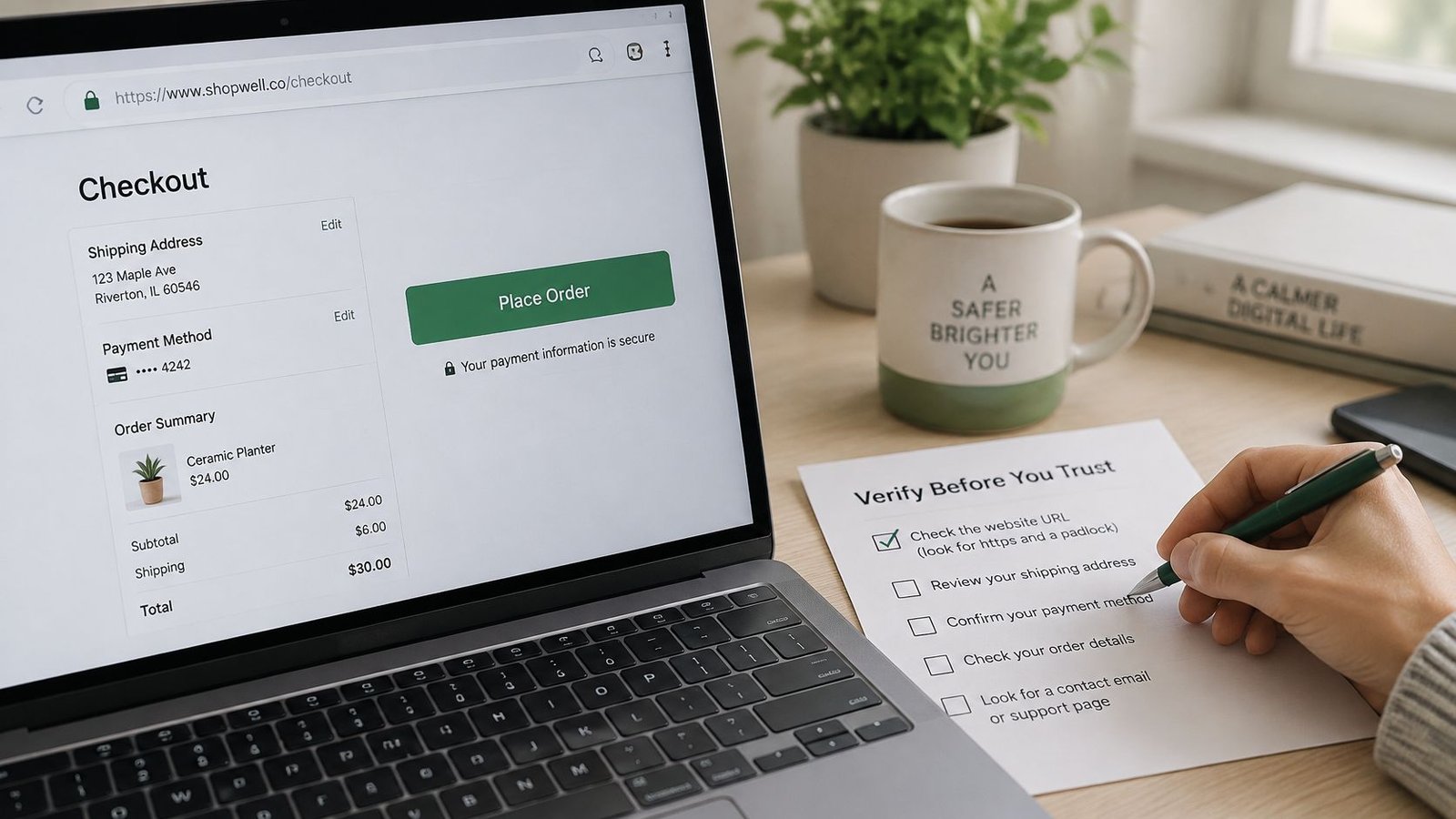
Check the live help material and terms against four questions.
- Does the offer page show the deal before payment? Look for the order summary, inclusions, price, currency and any fee, including any buyer service fee where one is shown.
- Does one order record hold the trail? Messages, delivery or access steps, payment status and dispute status should be readable against the same order, not scattered across apps.
- Is there a visible way to report a problem? A reporting route and the published buyer and seller protection notes should be findable without asking in a private message.
- Can the checkout be finished without a mouse? Tab through the fields, then try a screen reader if one is available, including a failed attempt and a retry.
The seller still owns the words and the follow-through. Descriptions, cancellation terms, correct handling of the order and timely messages aren't supplied by the payment screen. Fees, protection rules, refunds and payout timing should be taken from AmaJova's current terms and policies, not from memory of an older screenshot.
Check Your Checkout Before You Go Live
Run this on the live page, on a phone and on a desktop, before any live payment.
- Read it as a buyer. Confirm the price, inclusions, currency and fees match the offer you think you are selling.
- Place a test purchase where the provider allows one. The summary, the confirmation and the order reference should match.
- Check HTTPS and the seller name. Every checkout page should be encrypted, and the name should be one buyers already recognise.
- Use the keyboard only, then a screen reader if you can, through payment, a failed attempt and a retry.
- Write down who handles cancellations, refunds and disputes, and the timeline for each.
- Save the offer terms as sold, with the date, so a later edit doesn't erase what the buyer accepted.
If any step fails, fix the page before taking live payments. A checkout is only as secure as its least clear step.
AmaJova turns a service, a physical product, a download or a live session into one OfferLink, with the price and the order record kept together so buyers know what they are paying for. Secure checkout on that link is there to connect the payment to a clear offer, messages and a way to follow up, rather than leaving the sale in a chat thread. Visit AmaJova to set up an offer and check the current terms before you take a payment.